Remote Control
Battery installation and replacement
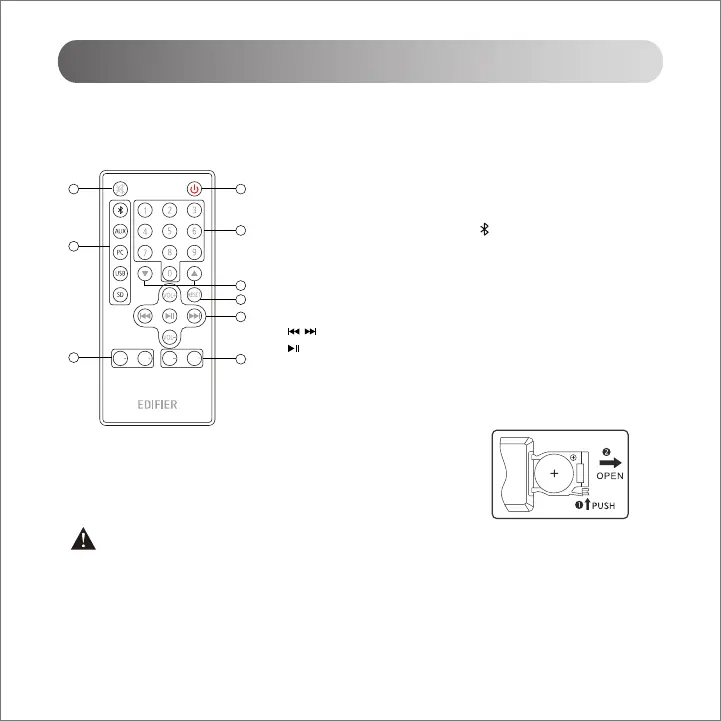
Please refer to the illustration to open the battery compartment, insert the
CR2025 battery and close the compartment.
Point the remote control to the remote receiving window on the amplifier, the optimum operational distance is 7 meters.
1. Mute
2. Standby/wake (effective only when the speaker is turned on)
3. Audio input selection: Bluetooth - AUX - PC - USB - SD
In Bluetooth mode, press and hold the " " button to disconnect Bluetooth
4. 0~9 numeric buttons
In USB/SD card mode, press one of buttons or continually press any
button to select music (such as, press 1 and 2 buttons to select track 12)
5. Previous/next folder (folder that includes MP3/WMA format music)
6. VOL+/VOL-: Master volume up/down
: Previous/next track (Bluetooth/USB/SD card mode)
: Pause/play
7. Reset button
Press and hold for around 3s: reset
8. Bass control
9. Treble control
1 2
4
5
6
9
3
7
8
BASS
BASS
TREB TREB
RC30F
WARNING!
DO NOT INGEST BATTERY, CHEMICAL BURN HAZARD
• (The remote control supplied with) This product contains a coin/button cell battery. If the coin/button cell battery is
swallowed, it can cause severe internal burns in just 2 hours and can lead to death.
• Keep new and used batteries away from children, if the battery compartment does not close securely, stop using the
product and keep it away from children.
• If you think batteries might have been swallowed or placed inside any part of body, seek immediate medical attention.
English



 To Next Page