English
$&9+]
0LQL86%
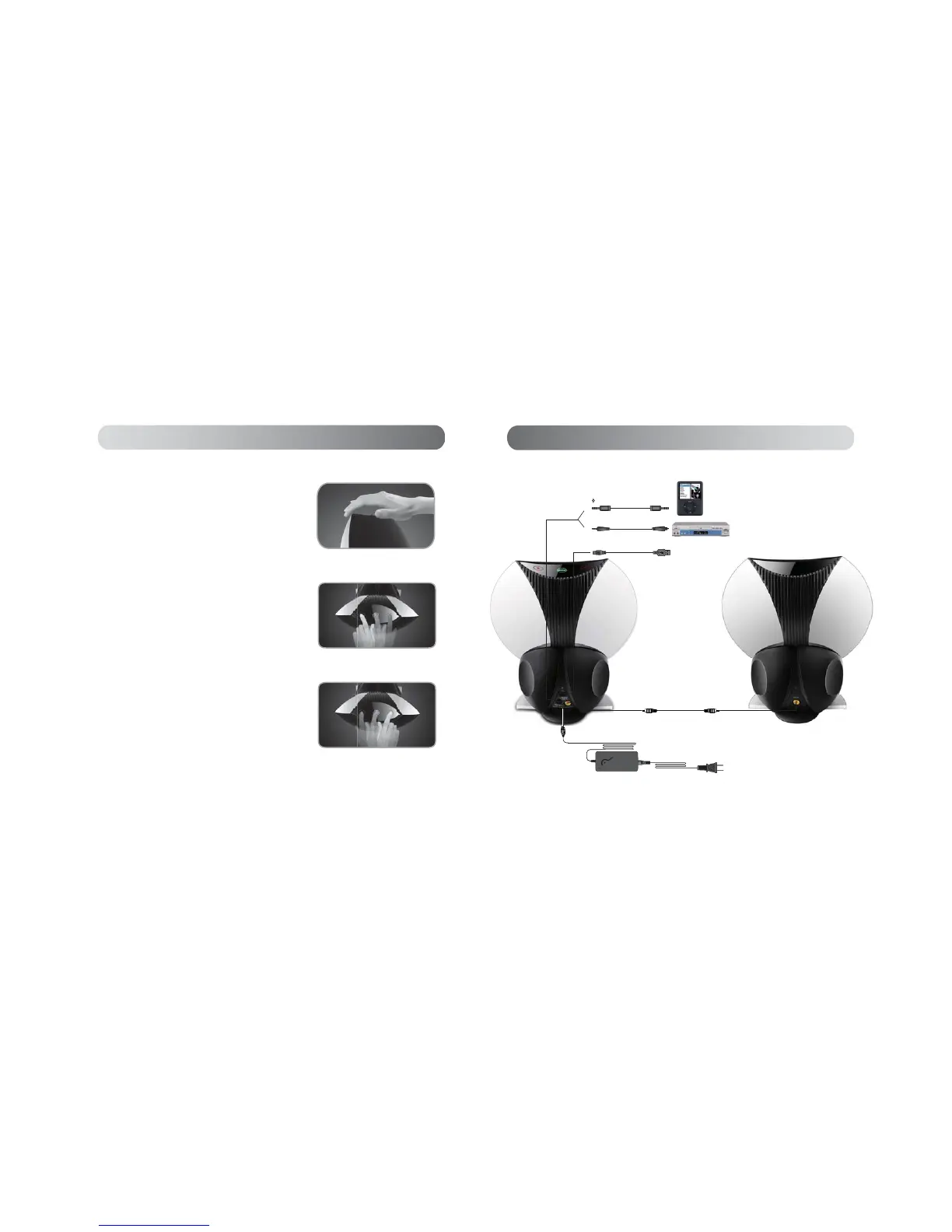
$FWLYHVSHDNHU Passive speaker
&RQQHFWHGWR86%FRQQHFWLQJSRUWRQ3&ODSWRS
Connected to iPod/MP3/MP4 etc.
&RQQHFWHGWR9&''9'RSWLFDOILEHURXWSXW
Connecting the system
5&$a5&$VSHDNHUFRQQHFWLQJFDEOH
Optical fiber
3.5mm
:KHQWKHV\VWHPLVFRQQHFWHGWRWKH$&ZDOORXWOHWWKHNH\PDUNHG
‘input’ in the middle of the touch sense panel will start to glow and
then will slowly change color indicating that the system is in standby
mode. Touching or swiping the control panel with you finger will
switch the system from standby mode to ‘on’.’ The key marked
‘input’ will no longer change color but will glow a steady green,
blue or red depending on the last selected input prior to being
VZLWFKHGRII7KHUHG/('VSHDNHUJULOOOLJKWZLOOEHLOOXPLQDWHGDQG
the keys marked ‘+’ and ‘-‘ will also be lit. Touching the key marked
‘input’ will change the input sequence from ‘Optical audio input’ (key
FRORUUHGWR¶$X[LOLDU\DXGLRLQSXW·NH\FRORUJUHHQWR¶86%
streamed audio input’ (key color blue). To re-enter standby mode
place the palm of your hand on the touch sense panel touching the
‘input’ the ‘+’ and ‘-‘ keys and hold it there for approximately 3
seconds. The system will power down and the key marked ‘input’ in
the middle of the touch sense panel will start to glow and change color
indicating that the system is in standby mode. The ‘+’ and ‘-‘ keys will
not be lit.
Operational guidance
67%<RQ
67%<RQ3OD\3DXVH
when the system is in working mode, a quick slap on the touch sense
panel with the palm of your hand shall pause the system, and another
slap brings the music back
Swiping a finger from left to right over the touch sense panel will
advance the media player to the next track in the user selected playlist.
3OD\3DXVHRQO\DYDLODEOHLQWKH86%PRGH
3OD\OLVWQH[WWUDFNVHOHFWLRQRQO\DYDLODEOHLQWKH86%PRGH
Playlist next track selection
3OD\OLVWSUHYLRXVWUDFNVHOHFWLRQRQO\DYDLODEOHLQWKH86%PRGH
Playlist previous track selection
Swiping a finger from right to left over the touch sense panel will select
the previous track in the user selected playlist
English


 To Next Page