29
WARNINGS AND DIAGNOSTIC MESSAGES (continued)
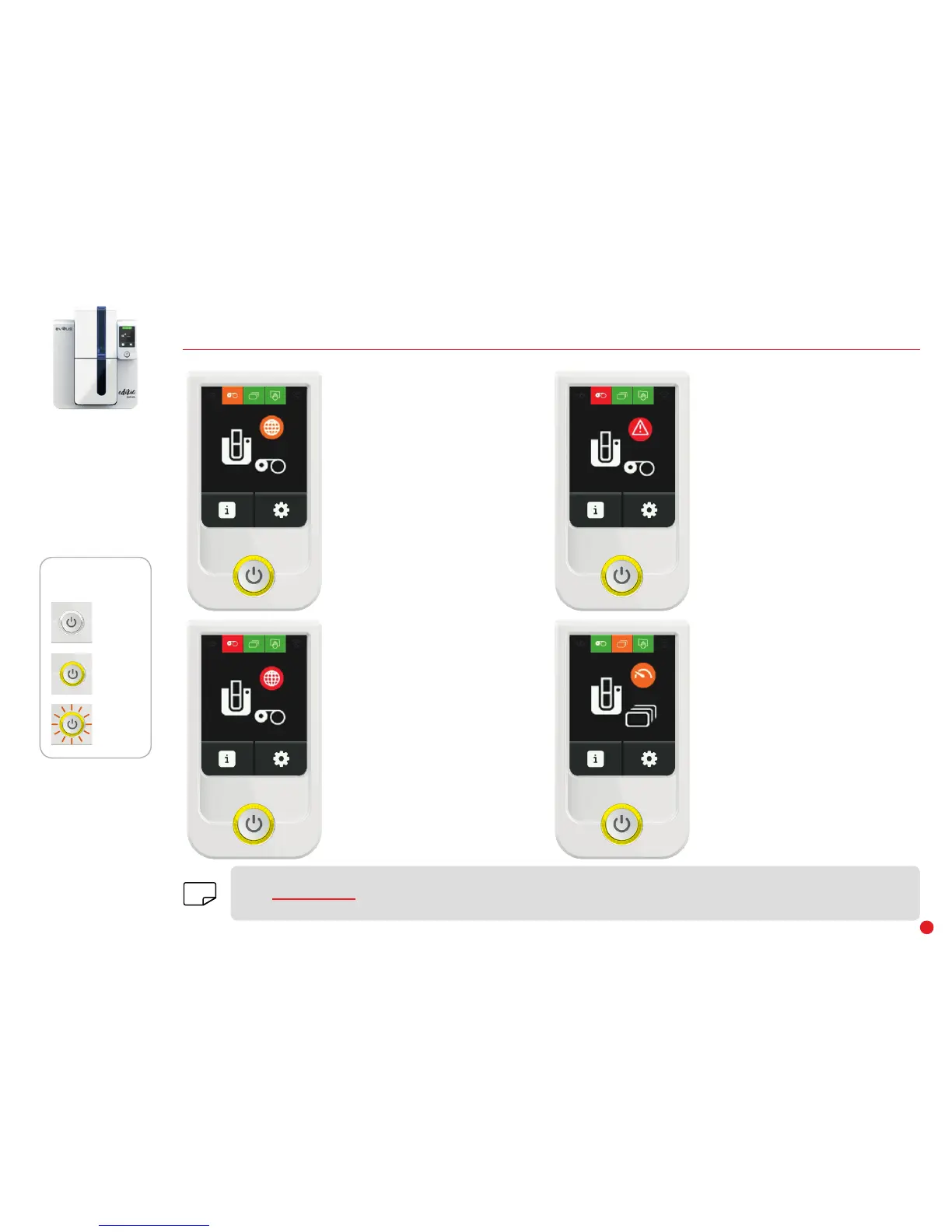
OFF
STEADY LIGHT
FLASHING
CONTROL BUTTON
STATUS
CARDS
• Card feeder almost empty.
Quickly load cards into the feeder.
RIBBON
• Wrong zone.
• Incompatible ribbon.
• You have less than 50 printable
cards remaining.
Change the ribbon. For any other
problems, contact your Edikio by
Evolis reseller.
RIBBON
• Incompatible ribbon.
• Print credit limit reached.
Please contact your Edikio by Evolis
reseller.
RIBBON
• No ribbon in the printer.
• End of ribbon.
• The ribbon is not correctly fitted.
• The ribbon is torn.
Check the status of the ribbon in the
printer before printing.
The Edikio Duplex printer has an LCD touchscreen. Please refer to the LCD screen user guide on how to operate it.
Go to www.evolis.com and under Drivers & Support, select your Edikio printer model and click on the "Manual and Documentation"
tab. Click on the LCD User Guide to download it.
NOTE


 To Next Page