30
WARNINGS AND DIAGNOSTIC MESSAGES (continued)
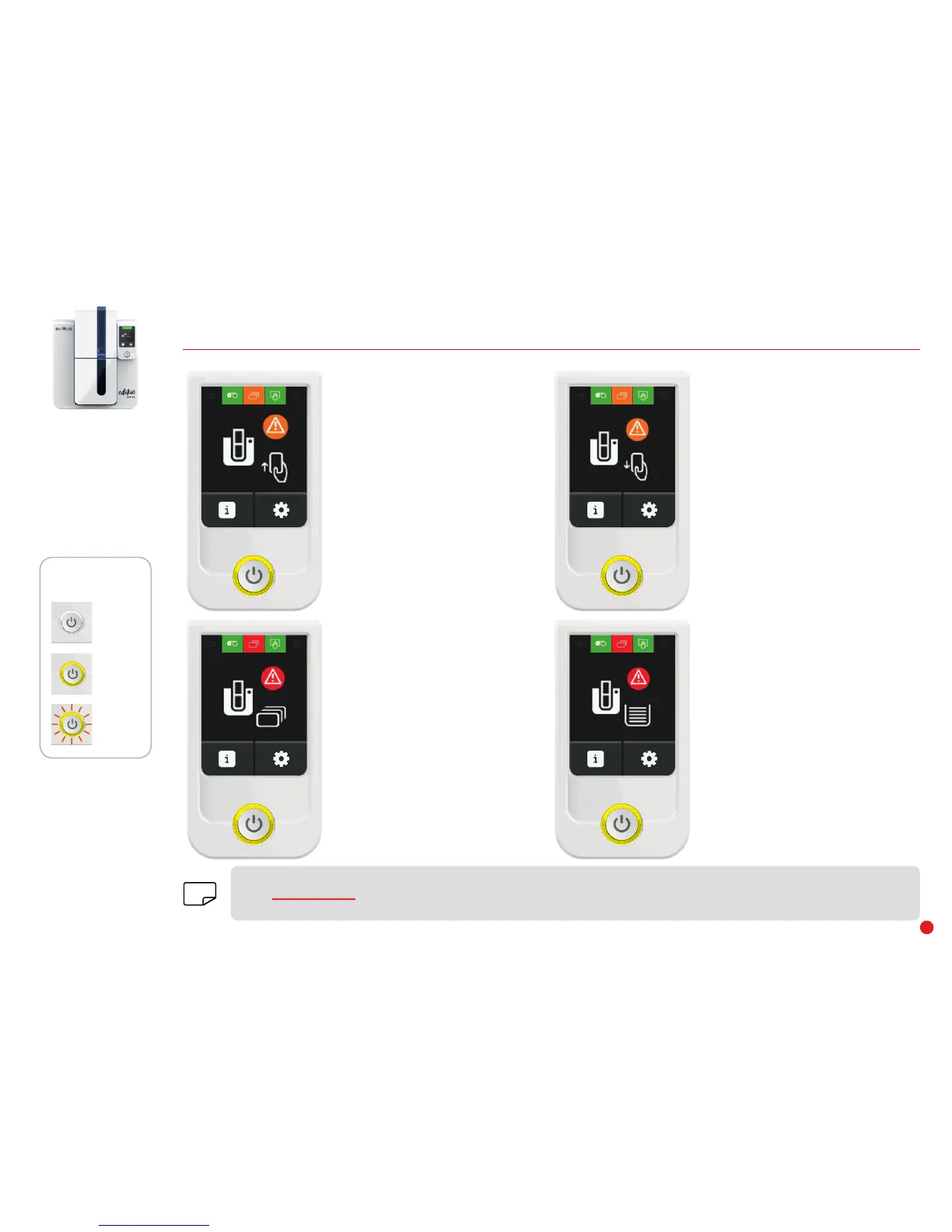
OFF
STEADY LIGHT
FLASHING
CONTROL BUTTON
STATUS
CARDS
• Output hopper full
Remove the cards from the output
hopper.
CARDS
• Waiting for card insertion into the
manual feeder.
Insert a card to print.
CARDS
• No cards in the manual feeder.
Load cards into the feeder.
Check the card thickness gauge.
Check the cards are loaded.
For any other problems, contact your
Edikio by Evolis reseller.
CARDS
• Waiting for card removal from the
manual feeder.
Remove card from the manual
feeder.
The Edikio Duplex printer has an LCD touchscreen. Please refer to the LCD screen user guide on how to operate it.
Go to www.evolis.com and under Drivers & Support, select your Edikio printer model and click on the "Manual and Documentation"
tab. Click on the LCD User Guide to download it.
NOTE


 To Next Page