www.edimax.com
EDIMAX TECHNOLOGY CO., LTD.
INTERFACE MANAGEMENT POWER ADAPTER
1 Ethernet ( RJ-45) Port
1 Power Jack
1 Reset Button
1 External Detachable Antenna
Provides Admin Utility, Camera
Viewer & Web browser management
Firmware upgradeable
DC 12V, 0.4A
LED HARDWARE HUMIDITY
LAN
WLAN
Power
1.3M Pixels CMOS Sensor
Manual Focus, F= 2.0
2 MB Flash
16 MB SDRAM
FOV
Horizontal: 128 degrees
Vertical: 99 degrees
10-90%
(Non-condensing)
FUNCTIONS DIMENSION & TEMPERATURE CERTIFICATIONS
View multiple cameras simultaneously - Up to 4
cameras within the local network or anywhere in
the world via the Internet
Supports one administrator account and four user
accounts
Sending snapshot to email and ftp server on a
predetermined schedule
Provides manual focus lens
Supports login free
Supports motion-detection by sending the snapshot
of events to email and ftp server
Records video clips manually or on a predetermined
schedule
Supports video playback
Recording format – Video (AVI)
Snapshot format – Picture (JPEG)
114 X 79 X 50 mm
0~45 ℃
CE, FCC
SYSTEM REQUIREMENTS
Windows 98/ME/2000/XP/2003/Vista
Internet Explorer 6.x and above
xDSL broadband router
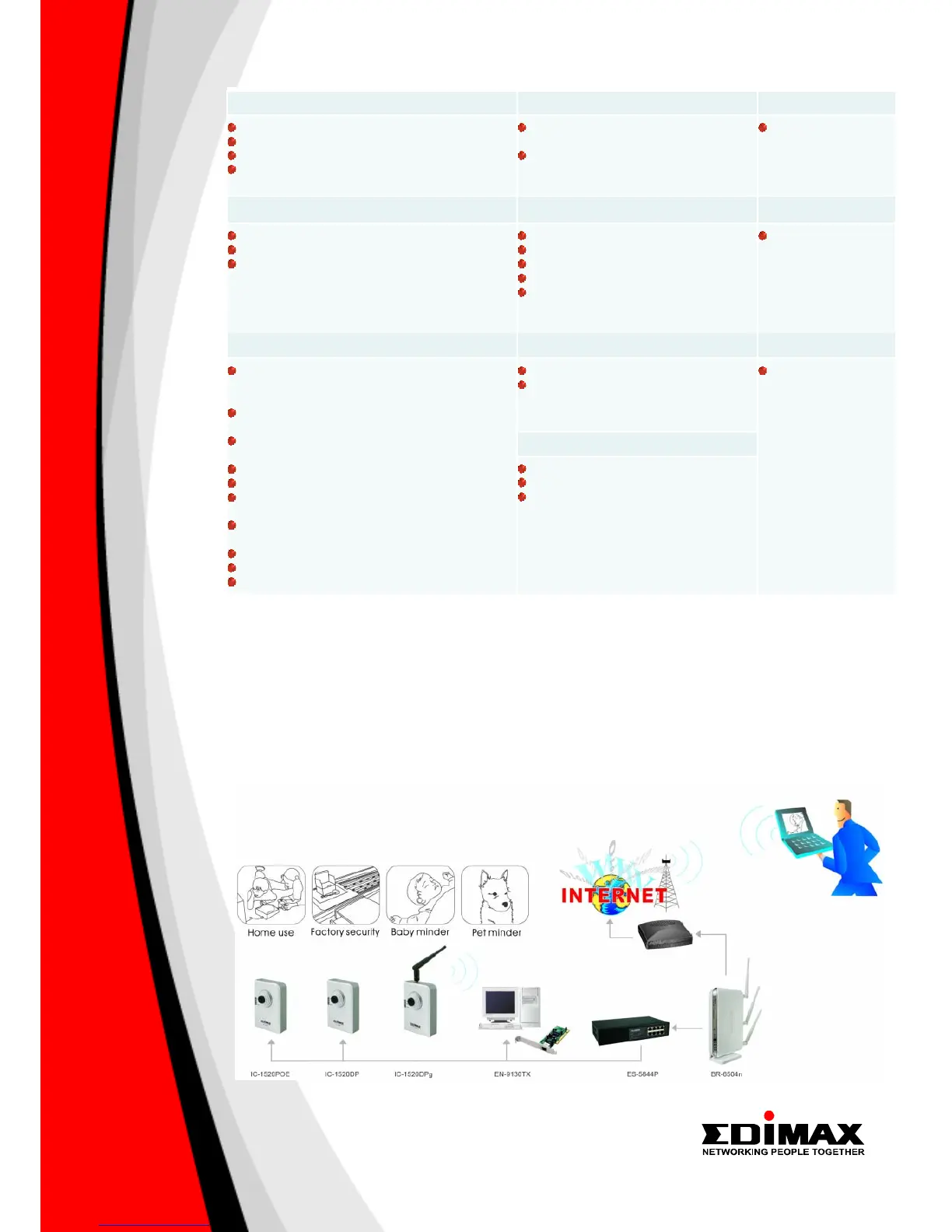
NETWORK SETUP DIAGRAM AND RELATED PRODUCTS
An example of how the IC-1520DPg can be setup:
• Connect the IC-1520DPg to PC by Ethernet (RJ45) LAN port.
• Install the Admin Utility into your PC and set up the IC-1520DPg IP subnet as same as Broadband Router’s.
• Configure IC-1520DPg with Broadband Router via wireless connection.
• All computers in the local network can now view the IC-1520DPg.
• To view the IC-1520DPg via the Internet, open the http and video ports in the router. Then, you can watch live video
from anywhere in the world.
FEATURES AND TECHNICAL SPECIFICATIONS



 To Previous Page