4K Ultra HD Camera With Autofocus User Manual
13
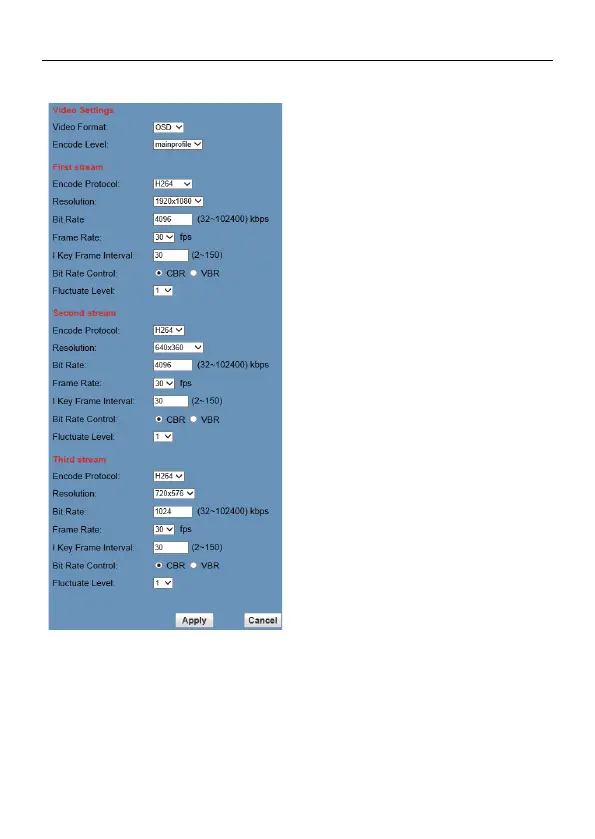
6.6.2 Video Settings
1) Video Format
Support 50Hz (PAL), 60Hz (NTSC) and
OSD three formats.
2) Encode Level
Support baseline, mainprofile, highprofile
three levels.
3) Encode Protocol
Support H.264, H.265 and MJPEG three
formats.
4) Resolution
First stream support 3840x2160,
1920x1080, 1280x720, 1024x576, 960x540,
640x480, 640x360; Second stream support
1920x1080, 1280x720, 1024x576, 720x576,
720x408, 640x360, 480x270, 320x240,
320x180; Third stream support 960x540,
720x576. The bigger resolution is, the
clearer the image will be, more network
bandwidth will be taken.
5) Bit Rate
User can assign bit flow/stream, normally
speaking, the bigger bit flow is, the clearer
the image will be. The bit allocation must
combine with network bandwidth, when the
network bandwidth is too narrow and the
allocated bit flow is too big, will cause video
signal flow not to be transmitted normally,
the video effect will be worse.
6) Frame Rate
User can specify the size of the frame rate,
generally, the frame rate greater, the image
more smooth; Frame rate is smaller, the
more sense of beating.
7) I Key Frame Interval
Set interval between three I frame, the
bigger interval is the response will be lower
from viewing window.
8) Bit Rate Control
Code stream control way:
Constant bit rate: video coder will be coding
according to preset speed.



 To Next Page