4K Ultra HD Camera With Autofocus User Manual
14
Variable bit rate: video coder will adjust the
speed based on preset speed to gain the
best image quality.
9) Fluctuate Level
Restrain the fluctuation magnitude of
variable rate, grade 1 ~ 6.
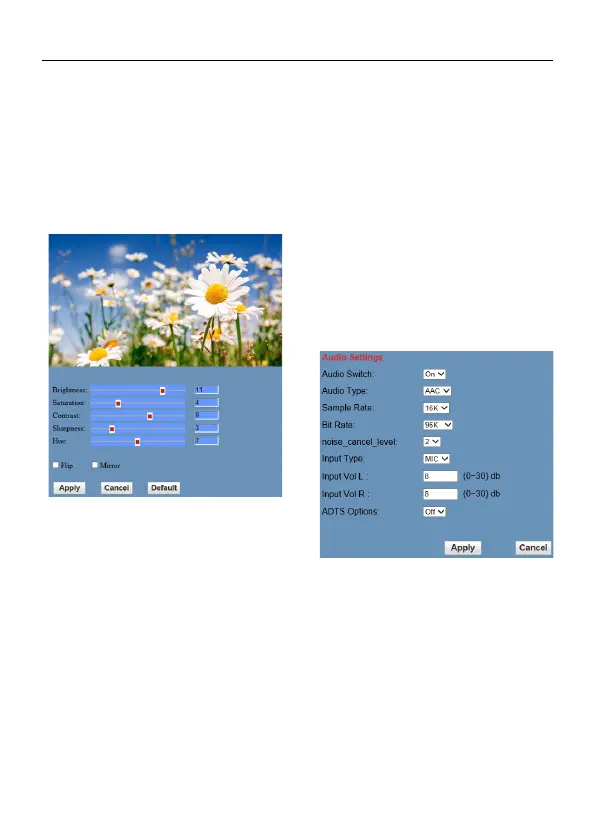
6.6.3 Image Settings
1) Brightness
Image bright 0~14, slider control, on the
right shows the corresponding numerical.
Default value is 11.
2) Saturation
Saturation 0~14, slider control, on the right
shows the corresponding numerical. Default
value is 4.
3) Contrast
Contrast 0~14, slider control, on the right
shows the corresponding numerical. Default
value is 9.
4) Sharpness
Sharpness 0~14, slider control, on the right
shows the corresponding numerical. Default
value is 3.
5) Hue
Hue 0~14, slider control, on the right shows
the corresponding numerical. Default value
is 7.
6) Flip & Mirror
Tick Flip to realize image upside down, tick
mirror to realize image around the mirror.
Default value is not tick.
6.6.4 Audio Settings
1) Audio Switch
Turn On/Off audio switch.
2) Audio Type
Audio type AAC.
3) Sample Rate
Sample rate 16K.
4) Bit Rate
Bit rate 48K, 64K, 96K, 128K selectable.
5) noise_cancel_level
Optional items: 0~3.



 To Next Page