Home
Edision
TV Receiver
PICCOLLO S2+T2/C
Page 13 (PAOK TV APPLICATION)
Edision PICCOLLO S2+T2/C - PAOK TV APPLICATION; Accessing the PAOK TV Application
20 pages
Manual
Go to English
Save Page as PDF
To Next Page
To Next Page
To Previous Page
To Previous Page
Loading...
V
ersion: Januar
y 9th, 2020.
13
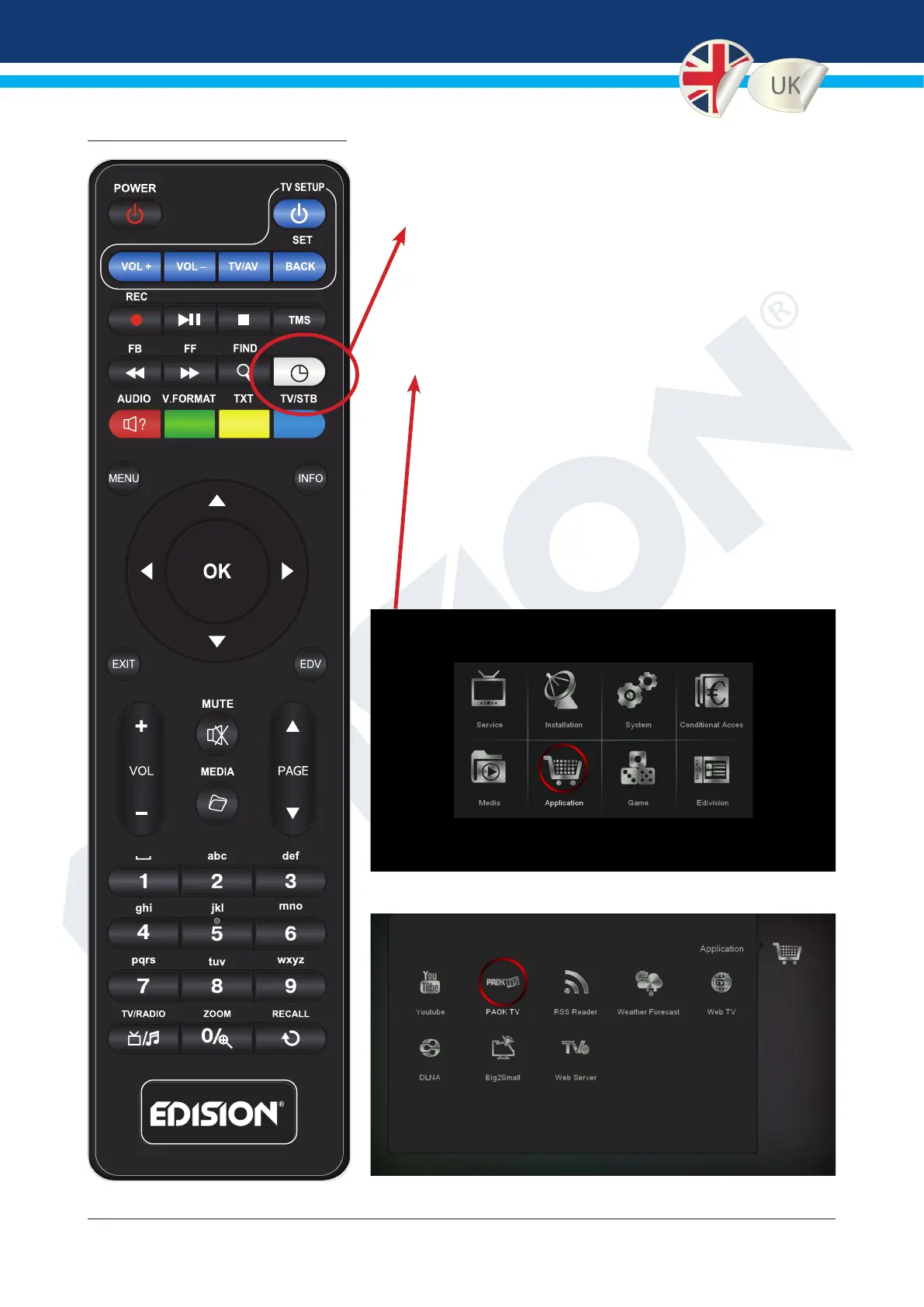
3. PAOK TV APPLICATION
2 ways of connecting to the P
AOK TV
APPLICA
TION:
1. By pressing the white «TV/STB» button on the
EDISION IR remote control
or
2. By entering the menu «Application», select «P
AOK
TV» icon
12
14
Table of Contents
Main Page
Greek
2
Table of Contents
2
Συνδεση Tv
3
Συνδεση Internet
3
Paok Tv Application
3
Αναβαθμιση Λογισμικου Edision
9
English
11
Tv Connection
11
Internet Connection
12
Paok Tv Application
13
Edision Software Update
17
Related product manuals
Edision Piccollino
32 pages
Edision picco T265+
28 pages



 To Next Page