Need help?
Do you have a question about the EDISON Professional Party System 2000 and is the answer not in the manual?
Covers reading, retaining, following instructions, heeding warnings, power source, heat, non-use periods, and service guidelines.
Details microphone inputs, USB/SD ports, master equalization controls for bass and treble.
Highlights playback keys (Previous, Play/Pause, Next) and volume/echo adjustment knobs.
Lists the items included with the product, such as remote control and instruction manual.
Details power output, connectivity features, speaker dimensions, impedance, and frequency range.
Provides solutions for issues like failing to electrify, no sound from various sources, or low volume.
Addresses no sound from external or wireless microphones and potential distortion issues.
Outlines the warranty period, coverage for parts and labor, and conditions for claims.
Provides contact details for support and instructions regarding product returns or issues.
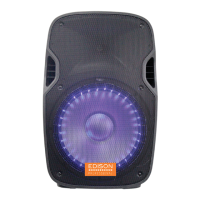
This document describes the EDISON PROFESSIONAL PA SPEAKER PARTY SYSTEM 2000, a professional PA speaker designed for party systems. It includes important safety precautions, detailed connection instructions, and troubleshooting tips to ensure safe and optimal operation.
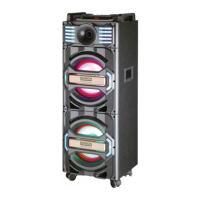
The EDISON PROFESSIONAL PA SPEAKER PARTY SYSTEM 2000 is a powerful audio system designed to deliver high-quality sound for various events and parties. It functions as a comprehensive PA speaker, integrating multiple audio input options, sound equalization controls, and microphone capabilities. The system is equipped with Bluetooth connectivity, allowing for wireless audio streaming from compatible devices. Its robust design and integrated features make it suitable for both casual and professional use, providing a complete audio solution for entertainment. The speaker system is designed to be portable, featuring wheels for easy transportation, making it convenient for use in different locations.
The PA speaker offers a wide array of usage features to enhance the user experience. It supports multiple audio input sources, including USB and SD card inputs, allowing users to play music directly from their storage devices. The system also includes dedicated microphone inputs, making it ideal for karaoke, public speaking, or live performances. Each microphone input has independent volume, bass, treble, and echo controls, providing precise sound customization.
A master equalization section allows users to fine-tune the overall sound output across different frequency bands (100Hz, 500Hz, 1KHz, 5KHz, 10KHz), ensuring optimal audio quality for various music genres and environments. The master volume control provides overall sound level adjustment, while separate microphone volume controls allow for balancing vocal levels with the background music.
The system features an LED information display that provides visual feedback on the current operational status. Additionally, LED lighting effects are integrated into the speaker design, adding a dynamic visual element to parties and events. A wireless remote control unit is included, offering convenient control over the system's functions from a distance, such as adjusting volume, changing tracks, or switching input modes.
Bluetooth connectivity enables seamless wireless streaming of audio from smartphones, tablets, and other Bluetooth-enabled devices. This feature eliminates the need for physical cables, providing greater flexibility and convenience in music playback. The system also includes an FM receiver, allowing users to tune into their favorite radio stations.
The intuitive layout of the control panel, with clearly labeled knobs and buttons, ensures ease of use. The play/pause, previous, and next keys provide standard media playback controls for USB and SD card inputs. The echo increase/decrease control allows for quick adjustments to the microphone echo effect, enhancing vocal performances.
Maintaining the EDISON PROFESSIONAL PA SPEAKER PARTY SYSTEM 2000 involves adhering to several important safeguards and troubleshooting procedures outlined in the manual. Regular maintenance helps ensure the longevity and optimal performance of the device.
The manual emphasizes the importance of reading and retaining all safety and operating instructions for future reference. Users are advised to follow all operating instructions and heed all warnings on the unit to prevent damage and ensure safe operation. Proper power source connection is crucial, and the appliance should be kept away from heat sources to prevent overheating.
For non-use periods, it is recommended to unplug the power cord from the outlet, especially if the unit will not be used for an extended time. This practice helps conserve energy and protects the unit from potential electrical surges.
In case of damage requiring service, such as a damaged power plug or cable, spilled liquids, exposure to rain, or abnormal functioning, the unit should be repaired by qualified service personnel. Attempting to repair the unit without proper qualifications can lead to further damage or safety hazards.
Troubleshooting tips are provided to address common issues. If the unit fails to electrify, users are advised to open the power switch and use the power adaptor to charge the battery if the built-in battery is consumed. For issues with no sound, solutions include changing the signal source, reconnecting signal lines, properly adjusting the main volume knob, inspecting USB disk or audio switch, and readjusting or changing external signal lines.
For external microphone issues, users are guided to ensure the microphone is fully inserted into the jack, the microphone switch is open, and the volume knob is properly adjusted. Similar troubleshooting steps are provided for wireless microphone problems, including checking if the switch is open, if the battery is inserted, and if the sound is distorted. These maintenance and troubleshooting guidelines are designed to help users resolve minor issues independently and ensure the device remains in good working condition.
 General
| Power Output | 2000 Watts |
|---|---|
| Bluetooth Connectivity | Yes |
| Microphone Inputs | 2 |
| USB Playback | Yes |
| LED Lighting | Yes |
| Type | Party Speaker |
| Woofer Size | 15 inches |
| Tweeter Size | 1 inch |
| SD Card Input | Yes |
| FM Radio | Yes |
| Guitar Input | Yes |
| Remote Control | Yes |
| Speaker Configuration | 2-Way |

 To Next Page