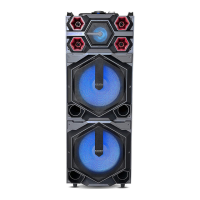
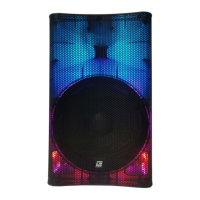
This document describes the EDISON™ PROFESSIONAL Multi-function Amplifier Speaker, model GD-PSW1211, a portable audio system designed for various entertainment purposes.
Function Description:
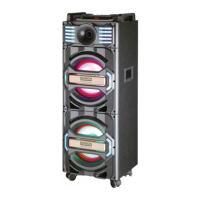
The GD-PSW1211 is a multi-function amplifier speaker that serves as a complete party system. It integrates a powerful audio amplifier with multiple input options, LED lighting effects, and a trolley design for easy portability. The device supports Bluetooth connectivity for wireless audio streaming, USB and SD card playback, FM radio, and auxiliary input. It also features two microphone inputs for karaoke or public address use, along with controls for microphone volume, treble, and echo. The speaker is equipped with LED breathing lights and additional decoration lights to enhance the visual experience. A remote control is included for convenient operation.
Important Technical Specifications:
- Power Output: 1200W PEAK
- Display: LED information display
- Connectivity: Bluetooth receiver, USB flash & SD card reader, FM receiver, AUX-IN
- Microphone Inputs: 2 x 6.3mm
- Audio Controls: Equalizer, Bass, Treble, Mic.Vol, Mic.Treble, Mic.Echo
- Lighting: LED Lighting Effects, LED breathing light, Decoration lights
- Speakers: 2 x 12" + 2 x 3" (Tweeters)
- Resistance: 3 ohm
- Power Source: AC-110V-240Vac 50/60Hz +/-10%
- Dimensions (approximate, based on image): A tall, rectangular unit with integrated wheels and a retractable trolley handle.
- Included Accessories: Remote control, Instruction Manual, FM Antenna, Audio Cable.
Usage Features:
The speaker offers a wide range of features for versatile use:
- Bluetooth Connectivity: The device can be connected to a Bluetooth-enabled source (e.g., smartphone, tablet) for wireless audio streaming. It supports auto-search and connection to the last paired device. If the last device is not found, it can be connected to a new device by searching for "EDISON PS112". Bluetooth can be activated or restarted by pressing the "Bt" input button or by using the PLAY/PAUSE, PREVIOUS, or NEXT buttons if the device cannot connect automatically.
- Multiple Audio Inputs: Users can play music from USB flash drives, SD cards, or external devices via the AUX-IN port. An FM tuner is also included for radio listening.
- Microphone Inputs: Two 6.3mm microphone inputs allow for karaoke or public speaking. Dedicated controls for microphone volume, treble, and echo are available on the front panel.
- Equalizer: The speaker features an equalizer (EQ) to adjust the sound profile. The remote control offers sound mode keys to choose between FLAT, POP, ROCK, JAZZ, and CLASSIC presets.
- LED Lighting Effects: The unit incorporates LED breathing lights and decoration lights, which can be controlled via the front panel (LED-1, LED-2, LED-3 buttons) or the remote control (LED ON/OFF button).
- Portability: The integrated trolley handle and wheels make the speaker easy to transport.
- Remote Control: A full-function remote control provides convenient access to power, mute, numerical input, repeat functions, mode selection, volume control, track navigation, play/pause, recording, sound modes, and LED control.
- Recording Function: The remote control includes a "REC" button to start and stop recording.
- Front Panel Controls: The front panel offers comprehensive controls for standby, main volume, play/pause, mode selection, previous/next track, color LED control, USB/SD card input, EQ, microphone inputs, microphone volume, treble, echo, bass, and treble.
- Rear Panel Connections: Includes audio out, AUX-IN, FM antenna connection, power switch, and charging input jack (AC input).
Maintenance Features:
- Safety Precautions: Users are advised to read all safety and operating instructions carefully. The device should not be exposed to rain or moisture to prevent fire or electric shock. It should be kept away from heat sources.
- Power Cord Care: The power cord should be unplugged from the outlet during long periods of non-use.
- Damage Requiring Service: If the power plug or cable is damaged, objects have fallen or liquid has spilled on the appliance, the appliance has been exposed to rain, or it is functioning abnormally, it should be repaired by qualified service personnel.
- Remote Control Maintenance: If the remote control does not work properly, users should check and replace the batteries. The remote should be aimed at the sensor within 6m and 30°, and all obstacles between the remote and the sensor should be removed. Strong sunshine can interfere with the remote's operation.
- FCC Compliance: The device complies with FCC rules, and users are warned against unauthorized modifications. In case of interference, users are advised to reorient or relocate the receiving antenna, increase separation between equipment and receiver, connect the equipment to a different circuit, or consult a technician. The equipment should be installed and operated with a minimum distance of 20cm between the radiator and the user's body.
- Warranty: BriteLite Enterprises provides a limited product warranty of 90 days for parts and 1-year labor. Customers should retain the original dated receipt as proof of purchase and contact BriteLite for service if needed, rather than returning the product to the dealer.

 Need help?
 General

 To Next Page