11
3
2
A
C
B
5
1
4
3
2
4
A
C
B
5
1
3
2
A
C
B
1
4
3
2
4
A
C
B
5
1
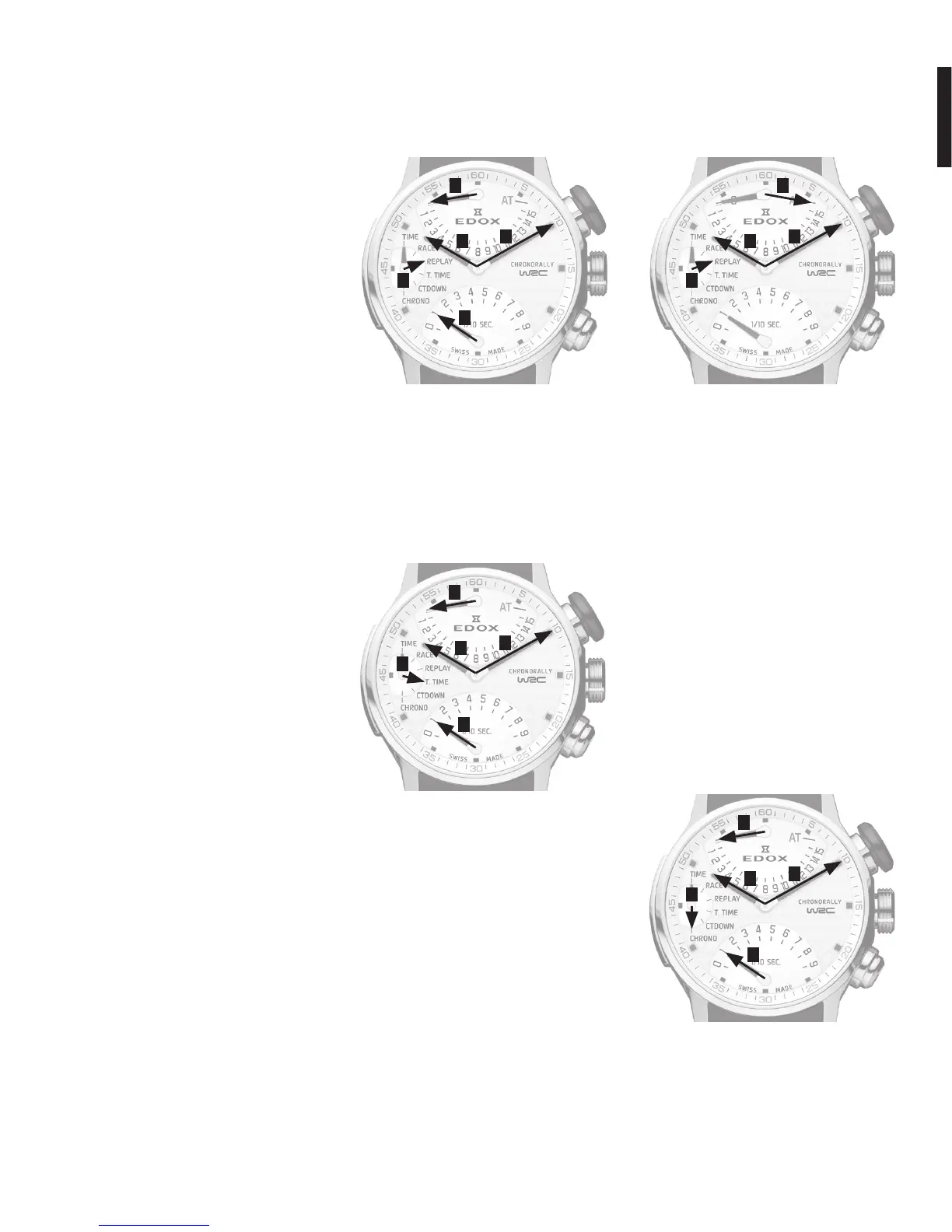
The race’s recorded time will remain dis-
played for 3 minutes. Without having to
activate the push-pieces, the hands will
automatically return to zero. Hand 3 will
then position itself for recording the next
race.
To go directly to the next recording, press
push-pieceB. Hand3will then beposi-
tioned ready for recording the next race.
•Presspush-pieceAtostartrecording
the second race.
Important note: once recording has
stopped, it cannot be restarted.
Important note: if, for safety reasons or
because of an accident, for example, the
race participant has not yet started, and
zero time must be recorded, press push-
pieceBfor5seconds.Hand3at12hwill
then be positioned for the next race and
zero time will be recorded.
If the race time has already been record-
ed,positionHand4inReplaymode(with
push-pieceC).Presspush-pieceAtopo-
sition on the recording to be cancelled.
Presspush-pieceBfor5seconds.Hands
1and2willpositiontozeroandthisre-
cording will then be cancelled definitively.
Display of recorded race times
(Replay mode):
•Presspush-pieceCtopositionHand4
in Replay mode.
•Presspush-pieceAaccordingtothe
number of recorded races in order to
review the recorded times.
Display of total recorded time (Total
Time mode):
•Presspush-pieceCtopositionHand4
in Total Time mode.
ThetimedisplayedbyHands1and2indi-
cate the total recorded time.
Addition of penalties (AT or
Additional Time):
•Presspush-pieceCtopositionHand4
in Replay mode.
•Pullpush-pieceCandHand3will
position itself on AT.
•Presspush-pieceAtoaddseconds
(Hand1).
•Presspush-pieceBtoaddminutes
(Hand2).
•Returnpush-pieceCtoitsinitial
position.
Usethesameproceduretoaddasecond
penalty.
Please note: Any new penalties should
be added to the previous penalty time by
following the same procedure.
Countdown display (Countdown
mode):
•Presspush-pieceCtopositionHand4
in Countdown mode.
•PressBtoshiftHand2,theminute
hand, back to the desired time.


 To Next Page