Programming Manual 1.3
PC Hardware Requirements
All user-defined system data must be entered on an IBM PC-compatible
computer and downloaded to the IRC-3 system via an RS-232C serial
port. Your PC must be UL EDP listed and have the following:
1. One RS-232C serial communications port.
2. 512K RAM minimum, 640K recommended.
3. Monochrome, CGA, or EGA monitor.
4. Disk drive in order of preference:
a. Hard drive.
b. High density floppy (1.4 MB, 1.2 MB, 720 KB).
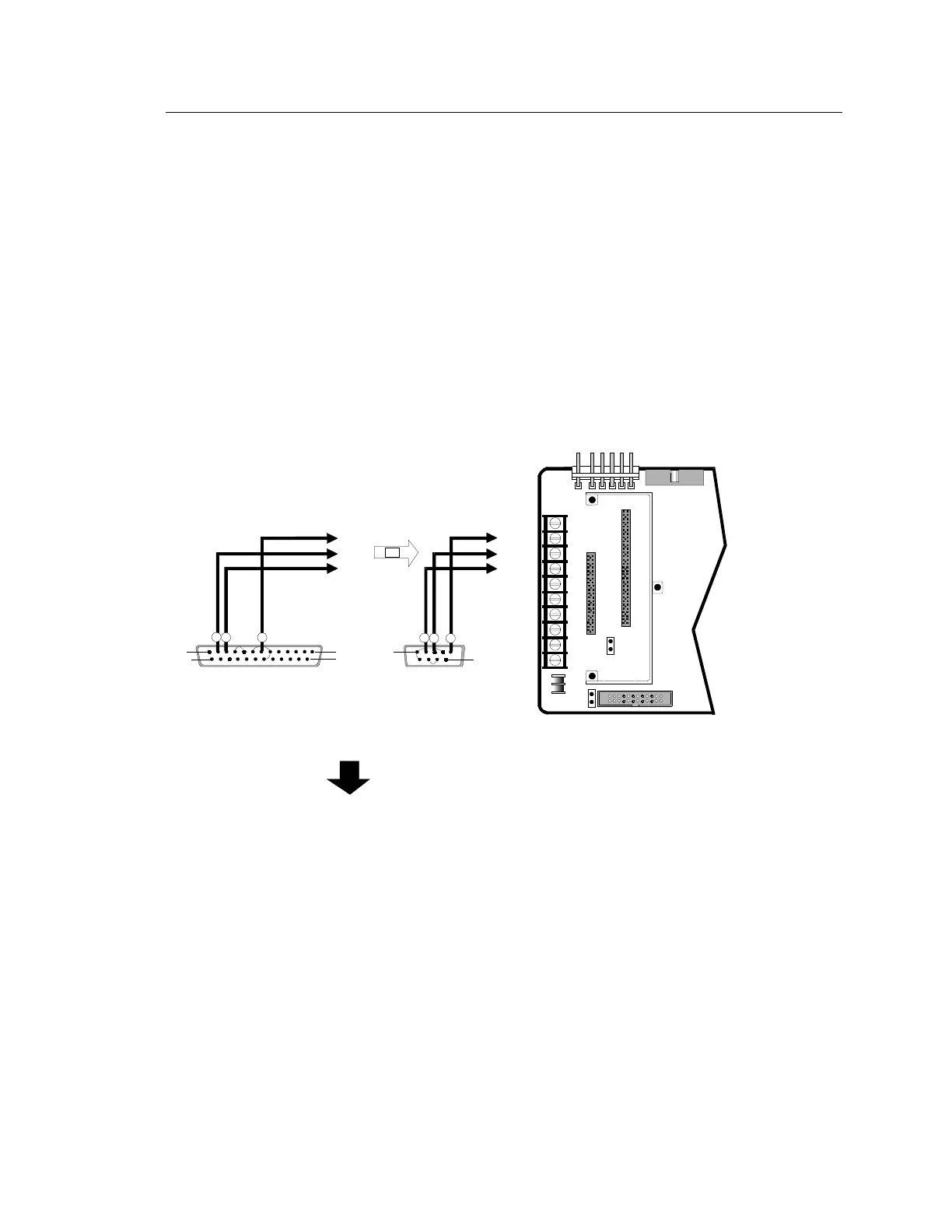
A serial cable must be used and wired according to the diagram below
to download the database from your PC to the network.
Jumper Connections:
Pins 6, 8, and 20
Pins 4 and 5
Jumper Connections:
Pins 1, 4, and 6
Pins 7 and 8
TB1-2
TB1-2
TB1-3
TB1-3
TB1-4
TB1-4
[NWC-004.CDR]
DB25 FEMALE or DB9 FEMALE
Download Cable
T
P
ERI
L P
RT
PIN 1
PIN 14
PIN 13
PIN 25
PIN 1
PIN 9
2
3 7
OR
2
3 5
CONTROL PANEL
MOTHER BOARD CM1(N) or CM2(N
TB1
4
8
10
1
5
3
7
9
2
6
P1
P2
P3
P4
P7
J1
J2
IRC-3 Data Entry Program Download Cable Wiring



 To Next Page