Need help?
Do you have a question about the Edwards SIGA-OSD and is the answer not in the manual?
Important notes regarding electrical power, sensor placement, and environmental conditions for detector installation.
Step-by-step instructions for attaching and wiring the SIGA-OSD detector to its base.
Procedure to verify proper detector address, trouble signals, and messages after initial installation.
Procedure to test the smoke sensor's functionality, including using the fire alarm control panel.
Details on operating voltage, current, vibration levels, mounting, compatible bases, and testers.
Information on North American standards, smoke sensitivity range, FCC, and Industry Canada compliance.
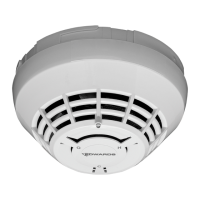
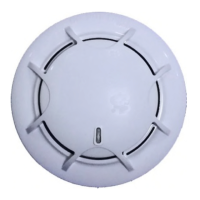
The SIGA-OSD Intelligent Optical Smoke Detector is a sophisticated device designed for integration into fire alarm systems, utilizing advanced optical sensing technology to detect the presence of smoke. Its primary function is to analyze data from its sensing chamber to accurately identify smoke from a fire while effectively distinguishing it from nuisance non-fire sources. This intelligent analysis allows the detector to make informed decisions about whether to initiate an alarm and communicate this information to the Fire Alarm Control Panel.
A key usage feature of the SIGA-OSD is its visual indicator. The device incorporates an LED indicator that provides immediate feedback on its operational status. In normal operating conditions, the LED indicator flashes green, signifying that the detector is functioning correctly and no action is required. When an alarm condition is detected, indicating the presence of smoke from a fire, the LED indicator flashes red, serving as a clear visual alert to evacuate the area.
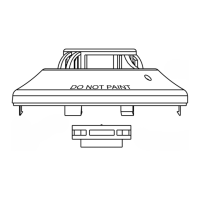
Installation of the SIGA-OSD detector is designed to be straightforward. Users are instructed to first install and wire the detector base according to the provided installation sheet. A practical feature during installation is the ability to remove the serial number label from the detector and attach it to project documentation, aiding in record-keeping and system management. The detector then attaches to the base by a simple clockwise rotation until it securely snaps into a locked position.
Several important notes guide the proper usage and installation of this device. It is crucial to understand that the detector requires electrical power to operate. In situations where fires might cause power interruptions, it is recommended to discuss additional safeguards with a local fire protection specialist to ensure continuous protection. The detector's effectiveness is also dependent on smoke reaching its sensing chamber; therefore, it may not detect fires in areas where smoke is obstructed, such as within walls, roofs, or behind closed doors. To guarantee optimal performance, the detector should be stored within recommended temperature ranges and allowed to stabilize to room temperature before power is applied.
A practical feature during construction and service is the inclusion of a dust cover. This cover must remain on the detector during installation and should only be removed prior to commissioning and servicing. It is important to note that this dust cover is not a substitute for removing the detector entirely during new construction or significant remodeling work, ensuring the sensing chamber remains clear of debris. Furthermore, the use of smoke detectors with detector guards is only advised if the combination has been evaluated and deemed suitable, preventing any interference with the detector's operation.
For installations in Canada, specific regulatory compliance is required, mandating adherence to the CAN/ULC-S524 Standard for the Installation of Fire Alarm Systems, the CSA C22.1 Canadian Electrical Code, and local jurisdictional requirements.
Upon completion of the initial installation, or following any modifications or additions to the system, a calibrated sensitivity test must be performed in accordance with NFPA code. The Signature Series devices, including the SIGA-OSD, are capable of performing this test, and the control panel can generate a system sensitivity report, which is a valuable maintenance feature for verifying proper operation.
Before conducting any testing, it is essential to notify the proper authorities that the fire alarm system will be undergoing maintenance and will be temporarily out of service. This ensures that false alarms are not dispatched and that the system's status is properly communicated.
To perform an initial installation test, several steps are outlined. First, the detector should be removed from its base to verify that the correct detector address, trouble signals, and messages are reported by the control panel. For SIGA-OSD detectors installed in air ducts, it is important to verify that the airflow is within specified parameters. If the system is wired for Class A operation, a critical usage feature is to verify that the detector continues to operate correctly even when the SLC_IN and then the SLC_OUT connections are successively disconnected, demonstrating its fault tolerance. A momentary ground fault should also be placed on the SLC circuit to confirm the proper operation of the ground fault detection circuitry. Finally, a system detector sensitivity report should be run on all detectors to ensure that readings fall within acceptable limits, and a sensor function test should be performed.
For the sensor function test, users have the option to use the fire alarm control panel to place the detector or zone into a service group for testing, as detailed in the panel's technical reference manual. The smoke sensor can then be activated using approved smoke aerosol sprays or a smoke generator, following the manufacturer's instructions.
Maintenance of the SIGA-OSD detector is crucial for ensuring its continued proper operation. A maintenance plan, which includes regular or selected inspections, should be established in accordance with the Authority Having Jurisdiction (AHJ) and all applicable governing laws, codes, or standards. Specific guidance for inspection and testing is provided by the CAN/ULC-S536 Standard for the Inspection and Testing of Fire Alarm Systems and NFPA 72 National Fire Alarm and Signaling Code. Additional information and cleaning instructions are available in application bulletin P/N 3102625-EN, further supporting the long-term reliability and performance of the device.
 General
| Operating Voltage | 24 V DC |
|---|---|
| Operating Voltage Range | 15 to 32 V DC |
| Type | Photoelectric |
| Operating Temperature | 0°C to 49°C |
| Humidity Range | 10% to 93% non-condensing |
| Air Velocity | 0 to 4000 ft/min (0 to 20 m/s) |

 To Next Page