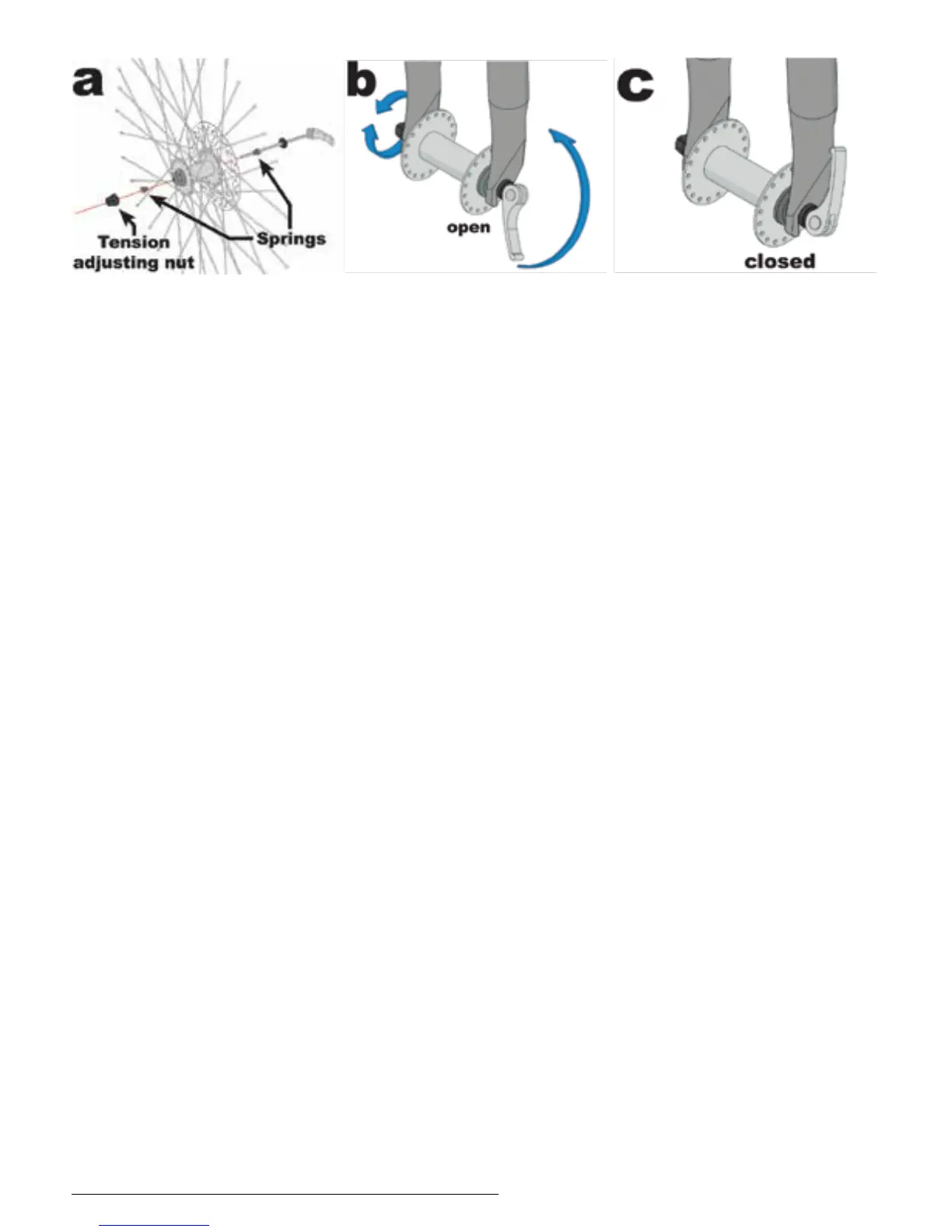
1. Remove the tension adjusting nut and one of the small
springs, then slide the quick release skewer through the hub.
If your bicycle has a disc brake, insert the skewer starting on
the side with the brake rotor. Replace the spring and tension
adjusting nut (g. a).
2. If your bicycle has rim brakes, disengage them to increase
the clearance between the tire and brake pads.
3. Install the wheel into the dropouts, making sure the quick
release lever is on the left side of the bicycle.
4. Holding the quick release lever in the OPEN position with
one hand, tighten the tension adjusting nut with your other
hand until it is nger tight against the fork dropout.
5. While pushing the wheel rmly to the top of the slots in the
fork dropouts, and at the same time centering the wheel rim
in the fork, move the quick release lever upwards and swing
it into the CLOSED position (gs. b & c) The lever should now
be parallel to the fork blade and curved toward the wheel.
To apply enough clamping force, you should have to wrap
your ngers around the fork blade for leverage, and the lever
should leave a clear imprint in the palm of your hand.
Currie Tech Technical and Customer Service: +1 800-377-4532
p. 16/52


 To Next Page