5. Operation
14
EFOY Pro 800 / 2400
3.1
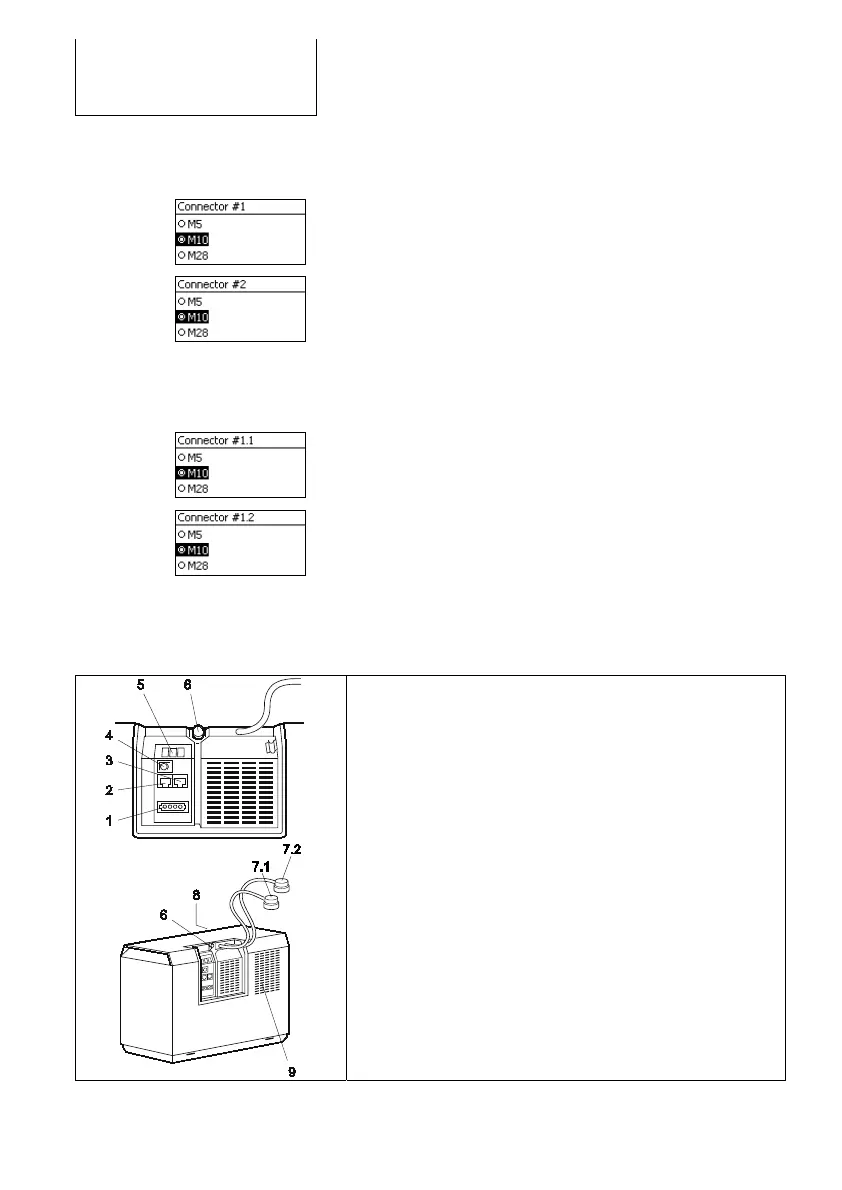
Use [S][T] to select the fuel cartridge, which is
connected to DuoCartSwitch connector #1.
3.2 Press [ok] to confirm your selection.
3.3 Use [S][T] to select the fuel cartridge, which is
connected to DuoCartSwitch connector #2.
3.4 Press [ok] to confirm your selection.
3.5 The DuoCartSwitch now is activated.
EFOY Pro 800 Duo / 2400 Duo / 12000 Duo
3.1 Use [S][T] to select the fuel cartridge, which is
connected to DuoCartSwitch connector #1.1.
3.2 Press [ok] to confirm your selection.
3.3 Use [S][T] to select the fuel cartridge, which is
connected to DuoCartSwitch connector #1.2.
3.4 Press [ok] to confirm your selection.
3.5 The DuoCartSwitch at fuel connector #1 now is
activated.
Analogue to this procedure setup fuel cartridges at
fuel connectors #2.1 and #2.2.
Connections EFOY Pro (Duo)
1. Connection for charge line
2. Connection for operating panel
3. Connection for data interface
4. Button
5. LEDs
6. Connection for exhaust hose and fill opening for service fluid
7.1 Connector #1 for EFOY fuel cartridge
7.2 Connector #2 for EFOY fuel cartridge
(Only in model “Duo”)
8. Cooling inlet (reverse)
9. Warm-air outlet and connection for off-heat duct



 To Next Page