5. Operation
17
DUOCARTSWITCH SWITCH2
Switch from fuel cartridge 1 to fuel cartridge 2. The level of
consumed litres is reset to zero.
This command cannot be entered via the control panel.
5.2.2 EFOY Pro 800 / 800 Duo / 2400 / 2400 Duo / 12000 Duo
Operation via Operation Panel OP2. Please refer to user
manual Interface Adapter IA1 for detailed description for
operation via a terminal program.
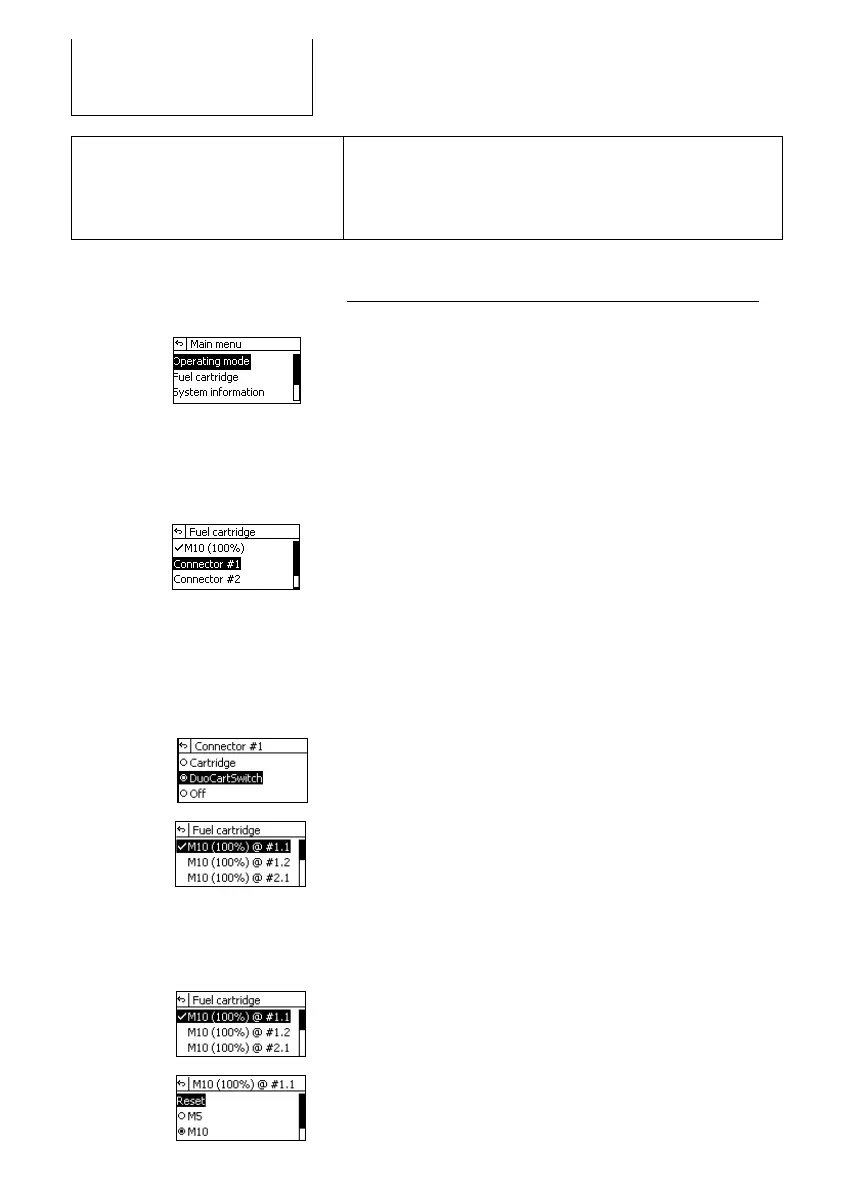
Press [menu]. The main menu appears.
Press [S][T] to select a submenu.
Select the menu item [Fuel Cartridge]
Press [ok] to access the selected submenu.
1. Select [Connector #1] or [Connector #2] to
change the connector and the belonging fuel cartridges.
2. Press [ok] to confirm your selection.
Activation of DuoCartSwitch DCS1 at fuel connector #1
1. Select [DuoCartSwitch] to activate the DuoCartSwitch
at connector #1. Press [ok] to confirm your selection.
2. A confirmation is displayed.
3. In the menu „Fuel Cartridge“ new menu items occur.
Select the connected fuel cartridges at fuel cartridge
connector #1.1 and #1.2 an press [ok] to confirm your
selection.
Analogue to this procedure select fuel connector #2.
Default setting after activation: Full M10 fuel cartridge.
Setup of fuel cartridge size
1. Select [M10 (X%) @ #1.1] or [M10 (X%) @ #1.2]
to change the fuel cartridge size.
2. Press [ok] to confirm your selection.



 To Next Page