36 56-VOLT LITHIUM-ION ELECTRIC LAWN TRACTOR — TR4200E
TRACTOR STATUS REFERENCE
LCD
Display
Description
Tractor
Status
Indicator
Audio
Indicator
Cause Solution
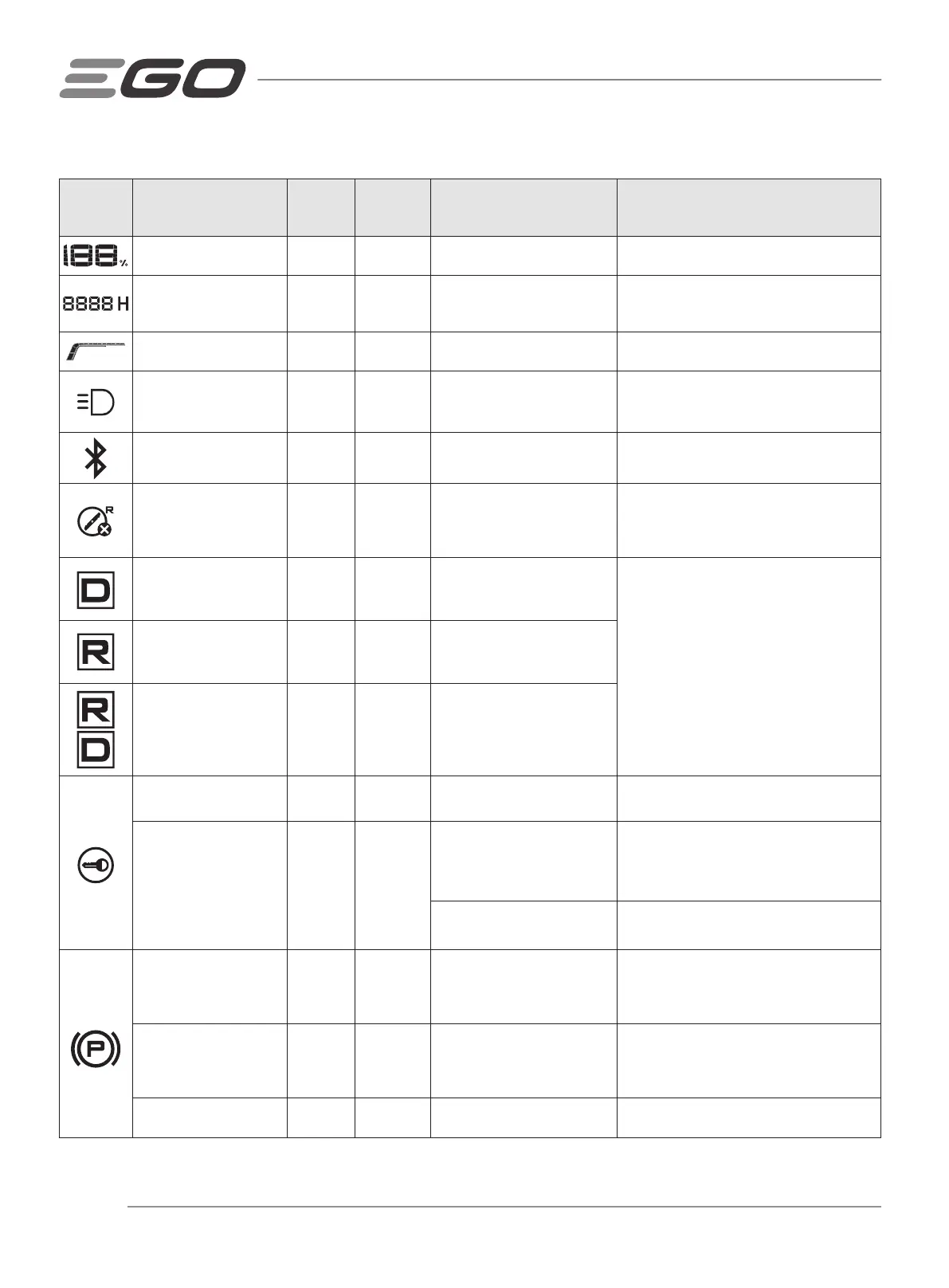
Fuel Gauge Icon OFF No
It indicates the average charge
capacity of inserted batteries
This is normal operation. No action is needed.
Hour Metre Icon OFF No
It shows the total driving time
of tractor, in hours and cannot
be reset.
This is normal operation. No action is needed.
Load Indicator Icon OFF No
It indicates the current load of
the tractor.
This is normal operation. No action is needed.
LED lights icon
illuminates on the LCD
screen.
OFF No
The headlights are turned on
by the LED light switch.
This is normal operation. No action is needed.
Bluetooth icon illuminates
on the LCD screen
OFF No
The tractor is connected to a
mobile device via Bluetooth.
This is normal operation. No action is needed.
MOWING IN REVERSE OFF
Icon illuminates on the
LCD screen.
OFF No
It indicates the blades cannot
be turned on when the tractor
moves in reverse.
This is normal operation. If needed, turn the
blades on while driving in reverse following
the section “TURNING BLADES ON WHILE
DRIVING IN REVERSE” in the manual.
Drive Icon illuminates on
the LCD screen.
OFF No
It indicates the tractor can be
driven or is driving forward.
This is normal operation. Place the direction
control lever in “D”, neutral, or “R” position
according to the need.
Reverse Icon illuminates
on the LCD screen.
OFF No
It indicates the tractor can be
driven or is driving backward.
Drive icon and reverse
icon blink alternately
OFF No
It indicates the tractor could
not be driven.
Safety key icon
illuminates
OFF No
The safety key is inserted
correctly.
This is normal operation. No action is needed.
Safety key icon blinks
when the LCD screen
displays “fuel gauge”.
OFF No
The safety key is not inserted.
Insert the safety key then fully depress the
parking-brake pedal and press the
START/STOP button simultaneously for more
than 3 seconds to turn on the tractor.
Key Control Panel Box
Assembly is broken.
Contact EGO customer service centre for
repair.
Parking-brake icon blinks
when the LCD screen
displays the “fuel gauge”.
OFF No
The parking-brake pedal is not
depressed.
With the safety key inserted, fully depress the
parking-brake pedal and press the
START/STOP button simultaneously for more
than 3 seconds to turn on the tractor.
Parking-brake icon
blinks when the LCD
screen displays operator
interface.
OFF No
Depress the accelerator pedal
before depressing the parking-
brake pedal to make the tractor
indicator shine green.
Start the tractor properly following the
section “STARTING THE TRACTOR”.
Parking-brake icon
illuminates
OFF No
The parking-brake pedal is set
at the parking-brake position.
Release it before starting the tractor.














 To Next Page