GHOST APP Function
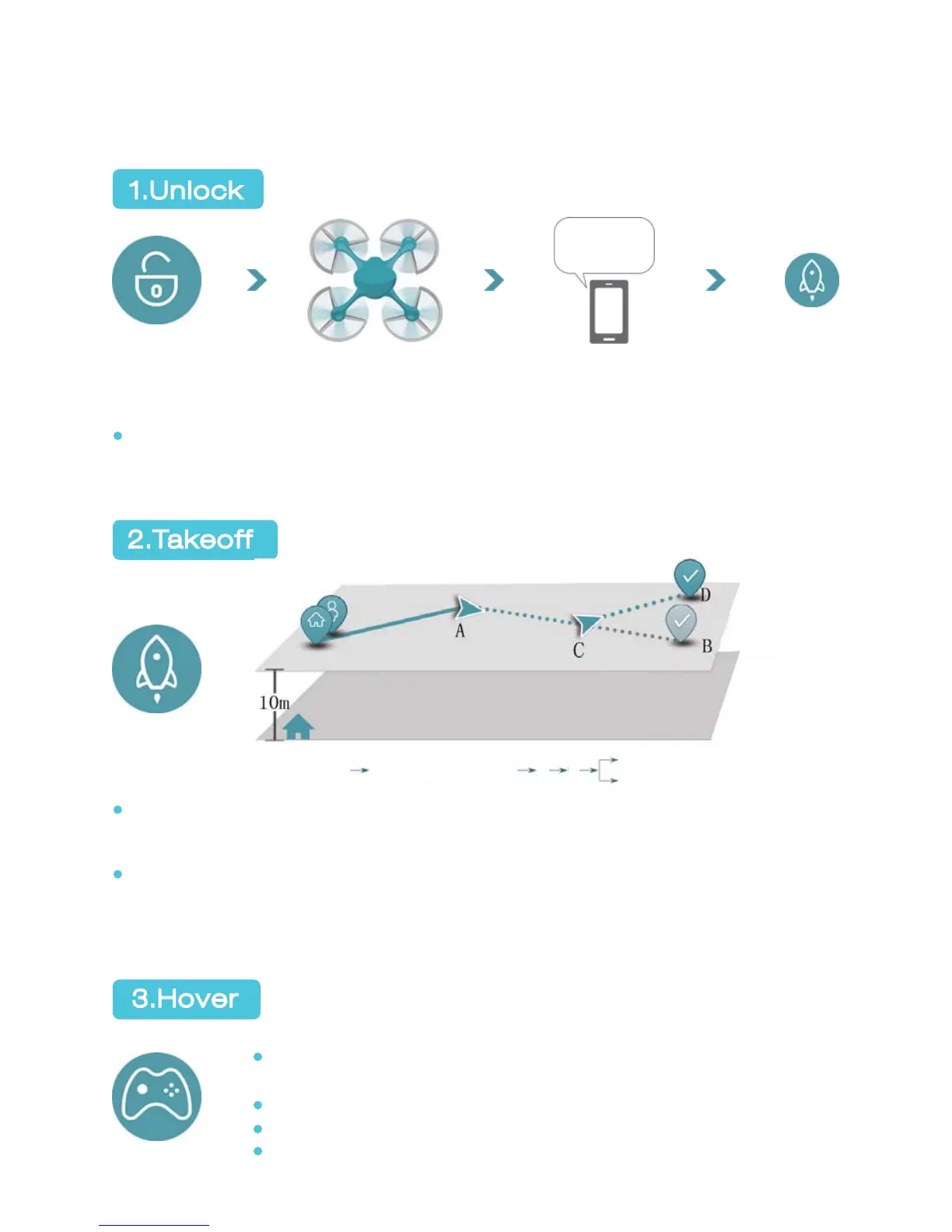
1.Unlock
2.Takeoff
3.Hover
Tap “TAKEOFF”
to fly GHOST
GHOST will beep if flight command is not received in three minutes and
thirty seconds. This is a normal notice. You can tap “UNLOCK” and “TAKE-
OFF” to fly GHOST or unplug the battery to extinguish this notice.
Voice noticePropellers spin at low speedUnlock
When satellite reaches 6 or above, GHOST can take off normally. When
user’s smartphone connects to Internet, the interface will display the
positions of user and GHOST on the GPS map.
See picture above: A is GHOST’s spot. Click any destination (B) on the
map to direct GHOST to B (from A to C to B). If the destination is updated
in midway, GHOST will fly from current spot C to the updated destination
D (from A to C to D).
Tapping “Hover” in any status will terminate the previous
command and keep GHOST hovering.
Ascend/Descend is not available during flight.
Estimate the height of barriers to avoid crushing.
Micro-control is available only in hovering status.
24
Unlocked,
ready to fly
updated destina-
tion spot
destination spot
A:GHOST spot C:Midway spot
Takeoff point
ascend and hover
to 10m height
A
C
B(destination)
D:updated destination spot


 To Next Page