26
ࡶ/䭼
ᒯ䪮៸
ᒯ䪮៸
不㵻ࡶ
不㵻ࡶ
䒛
不㵻
䶩ᬥ䦷䒛
不㵻
䔵ᬥ䦷䒛
ᒯጕ
䪮៸
ᒯ
䪮៸
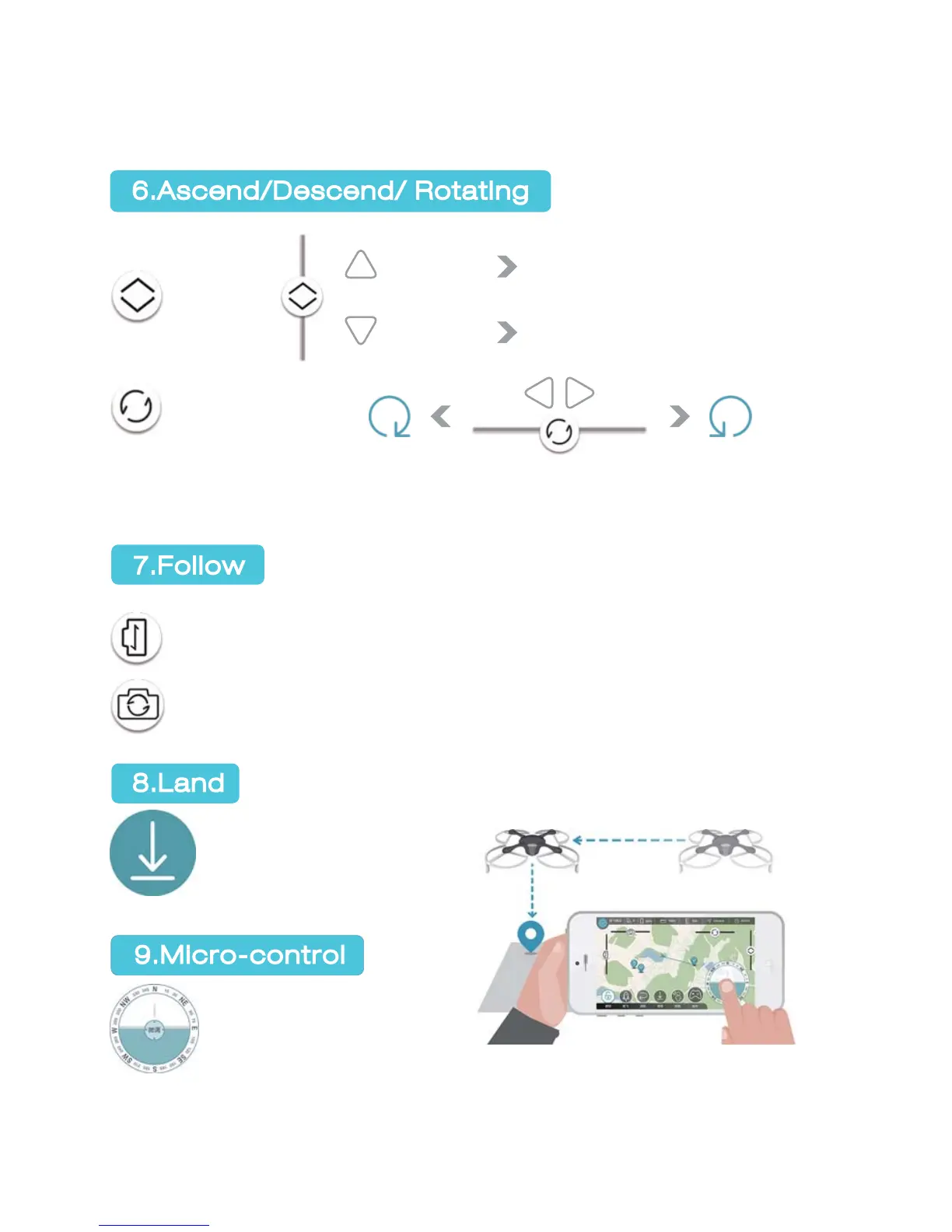
Height control is only accessible in hovering status. During flight, the height
control bar is hidden on right side of the APP interface.
Horizontal slidebar: Gimbal tilts right and left (no automatic reposition
after release)
Vertical slidebar: Gimbal tilts upward and downward (no automatic
reposition after release)
GHOST locks automati-
cally five seconds after
landing.
Micro-control enables
accurate landing.
GHOST will move horizontally. Red lights mark the front, blue lights mark the
rear. Drag the virtual compass to the destination spot and release to direct
GHOST to the destination.
6.Ascend/Descend/ Rotating
GHOST APP Functions and
How to Use GHOST APP
7.Follow
8.Land
9.Micro-control
Ascend/
descend
Rotating
Pull upward
Pull downward
GHOST ascends
GHOST descends
Rotate
clockwise
Pull
leftward
Pull
rightward
Rotate
anti-clockwise


 To Next Page