2 - 7
3.1.5. Group Programming
3.1.4. Paging to a set of Zones: the “zone
combination” function
(the New 100 Series only)
The 400 Series
The New 100 Series
In 400 Series installations each control unit has the ability of having one or more
group codes assigned. The codes must be defined in each control unit's
Configuration and Installation Menu, depending on the model (see CC-1034
User and Installation Manual for the 400 Series).
In New 100 Series installations that have the zone transmission feature (see
2.1.2.), the definition of groups of zones takes place at the microphone base
itself. A maximum of 10 groups of 10
zones each is permitted.
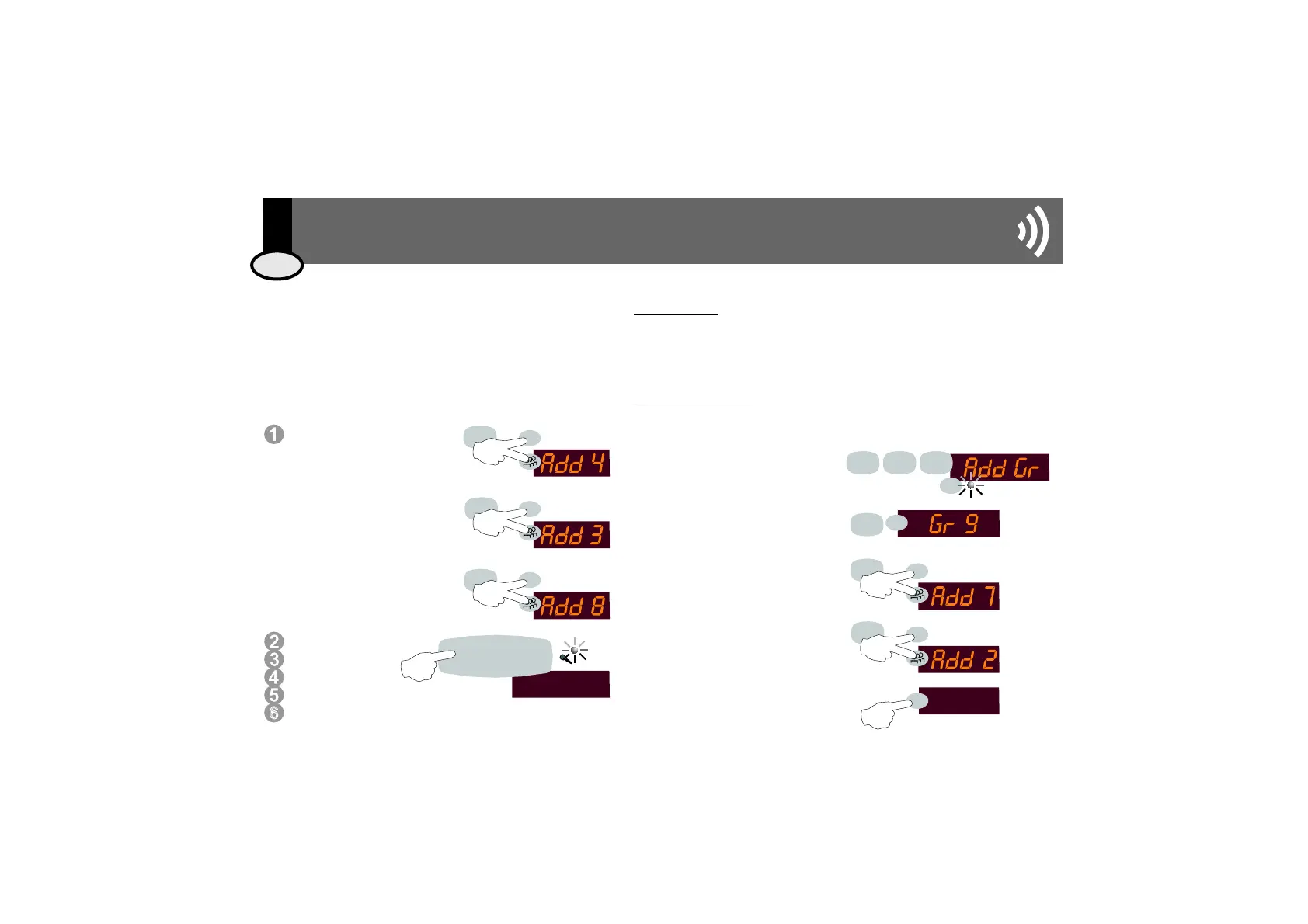
To create a group, key in 921 followed
by the PRG button.
Select a group between 1 and 10 (for
example, 9) and press the PRG button.
Select the zone number you wish to add
to the group (for example, zone 7). To
confirm, keep the PRG and GROUP
buttons pressed for 1 second.
Repeat the process for as many times
as necessary to add the desired number
of zones, up to a maximum of 10.
To store the programming into memory,
keep the PRG button pressed for 1
second.
Intercom transmission to a set of zones is possible in New 100
Series installations that allow for individual intercom transmission
(see 2.1.2.). In contrast to group intercom transmission, this
operation DOES NOT STORE IN MEMORY the set of zones to
which the transmission is addressed.
Key in the zone address (for
example, zone 4).
To add new zones,
simultaneously press the PRG
and GROUP buttons for 1
second.
Key the other zone address (for
example, zone 3).
Repeat the process for as many
times as necessary in order to
add the number of zones
desired, up to a maximum of 10.
Follow the same procedure
of pressing the TALK
button as described
in the rest of the
transmission operations in sections
3.1.1., 3.1.2. and 3.1.3.
3
8
4
PRG
PRG
PRG
1s
1s
1s
9
PRG
7
PRG
1s
2
PRG
1s
6
9
2
1
PRG
1s
EIS
15
PRG
PRG
3 - 4 - 8
T A L K
ENG
3. User Manual
3.1. To make an announcement



 To Next Page