EIT Part Number: P/N IM-0110 Rev A Issued April 2019
Page 10
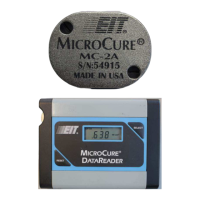
DataReader
The DataReader requires occasional battery replacement, and will indicate a low battery condition by scrolling "LO" across
its display. To change the battery:
1. Remove the two screws from the plate on the left side of the DataReader.
2. Remove the battery and replace it with a new 9-volt lithium or alkaline battery.
3. Reinstall the access plate and screws.
DataReader Display Cleaning Instructions
Clean cotton swabs, lint free wipes, or EIT prepackaged optical wipes are recommended for cleaning the display
window. Use of high quality Isopropyl Alcohol is acceptable.
WARNING:
DO NOT USE ACETONE TO CLEAN THE DATAREADER DISPLAY SCREEN AS IT MAY DAMAGE THE DISPLAY.
Use caution with chemicals used in inks, coatings, adhesives and resins that may be near or come in contact with the
MicroCure.
The customer assumes all responsibility for damage to their EIT instrument as a result of chemical contact with the
MicroCure or DataReader.
Customers are advised to obtain and read the SDS/MSDS for any chemical used in either their process or in the cleaning
of optics and to take necessary precautions.
The MicroCure radiometer is calibrated prior to shipment from EIT. It is specified to take 200 readings or a period of
approximately one year. Once the unit meets one of these conditions, it must be replaced.
The MicroCure Unit contains a battery. Any expired MicroCure units may be returned to EIT for proper disposal of the
electronics and battery. Customers are responsible for the return shipping to EIT.
Please return to:
Electronic Instrumentation and Technology (EIT) LLC
Attention EIT Instrument Markets
309 Kelly’s Ford Plaza SE
Leesburg VA 20175 USA


 To Next Page