6
In the case that other intercoms have formed a team, you can become the listener of
the team through pairing.
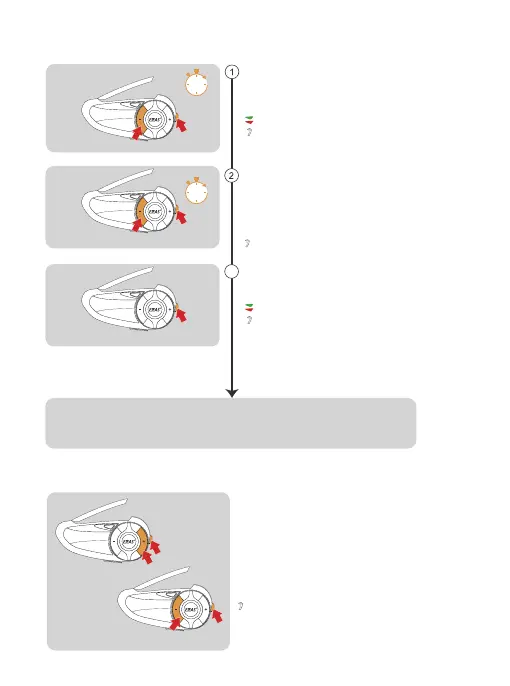
Take an intercom that has been paired as a
paired server, entering listening mode pairing,
and press and hold <Intercom Button> +
<Volume -> (about 5s) to prompt "Listen Mesh
Pairing".
Note: Unjoined machines can only be joined again
through the server.
Take the intercom to be paired, enter listening mode
pairing, long press <Intercom Button> + <Volume ->
(about 5s), and prompt "Listen Mesh Pairing", the red
light and green light will flash alternately.
“Listen Mesh Pairing”
Red light and green light flash alternately
“Du”
“Channel n,xxx.x MHz”
“Listen Mesh Pairing”
Wait a moment and hear "Pairing Successful" from all intercoms. Wait a few more minutes and
hear "Channel n, xxx.x MHz". This means that you have joined the
intercom network and can communicate with others.
Pairing Steps as Listeners:
There are 5 channels in total, short press <Intercom Button>
+ <Volume ->/<Volume +> to switch channels
forward or backward. Note that the whole team needs
to keep the same channel to talk to each other.
When the signal is unstable, you can switch channels to adjust.
Intercom Channel Switching
Short press the <Intercom Button>, you will
hear a beep and the red light and green light will
flash alternately.
3
Red light and green light flash alternately
Paired Server
Paired Server
5s
5s


 To Next Page