5
If the device is powered off without turning the intercom off, the intercom will be automatically
restored upon the next power-on.
Intercom Reconnection
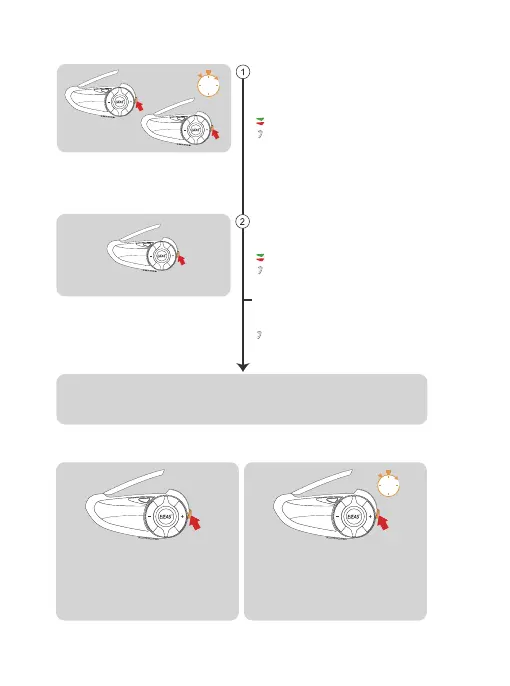
Press and hold the <Intercom Button>
(about 1s) to turn off Mesh Intercom .
The voice prompts "Mesh Close".
Turn off MESH Intercom
Take one of them as the paired server, press
<Intercom Button> , you will hear a beep and
the red light and green light will flash alternately.
Wait for a moment and hear "Pairing
Successful" from all devices, which
means the pairing is successful.
All devices first enter the intercom pairing
state, long press <Intercom Button> (about
5s) until you hear a prompt and the red light
and green light flash alternately.
Red light and green light flash alternately
“Mesh Pairing”
Red light and green light flash alternately
“Bi”
“Pairing Successful”
Paired Server
Wait a few moments and you hear the prompt "Channel n, xxx.x megahertz"
from all the intercoms, you can start communicating and hear each other's voices.
Pairing Steps as Members:
When you power on the intercom for the
next use, short press the <Intercom Button>.
You will hear the prompt "Join
the Mesh." Wait for a moment, and you
will hear the prompt " Channel n, xxx.x
megahertz", you can talk to each other.
5s
1s


 To Next Page