19
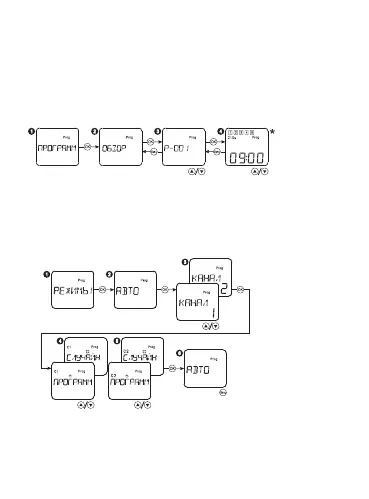
Select the menu item PROGRAM, press the button OK. Select the menu
item DELETE, press the button OK. If required to delete one program,
select the item ONE, then select the number of the deleted program
with the buttons «▲▼» and press OK. If required to delete all the pro-
grams, select the item ALL and press the button OK to conrm the
memory cleaning.
Review of congured programs:
Недельная
программа
Годовая программа
Недельная
программа
Годовая программа
Select the menu item PROGRAM, press the button OK. Select the menu
item REVIEW, press the button OK. After that you can review all the
congured programs with the buttons «▲▼».
Random operating mode setting up:
Только для
реле с 2 C/O


 To Next Page