20
Select the menu item MODES, press the button OK. Select the menu
AUTO, press the button OK. Select the channel and then select the
operating mode of the timer: automatic- as per congured program,
or random – a random activation of the time is within 1 to 30 minutes.
Press MENU to complete program conguration.
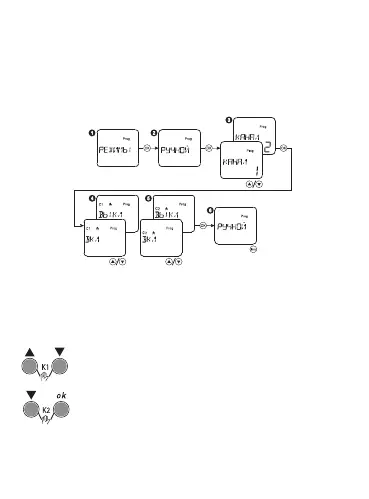
Manual mode:
Select the menu item MODES, press the button OK. Select the item
MANUAL, press the button OK. Select the channel, set the position of the
ON or OFF contacts.
Press MENU to complete program conguration.
Ручное управление
When the buttons «▲▼» will be pressed at the same time,
the output contacts 18-15 of channel K1 will be constantly
closed. When the buttons «▲▼» will be pressed again at the
same time, the timer will be returned to the automatic mode.
When the buttons «▼» and «ОК» will be pressed at the
same time, the output contacts 28-25 of channel K2 will be
constantly closed. When the buttons «▼» and «ОК» will be
pressed again at the same time, the timer will be returned
to the automatic mode.
Только для
реле с 2 C/O


 To Next Page