8
Press «MENU» to enter the main menu. With the buttons «▲▼»
select the desired menu item. If there is no activation for one min-
ute, the timer will exit automatically from the menu.
Astro mode setting:
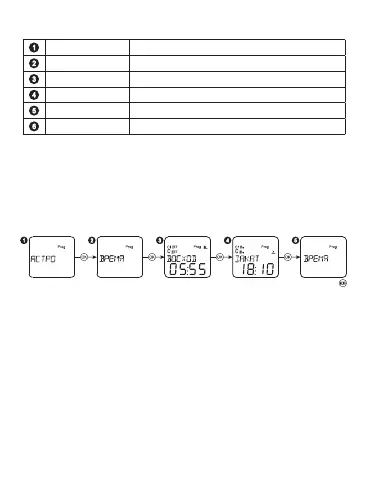
View the sunrise/sunset time:
Astro Astro mode setting
PROGRAMM Programming mode
DATE/TIME Date and time settings
MODES Mode settings
SERVICE Other settings
END End of settings and exit from the menu
Таблица 3.
Select the mode ASTRO, press «OK». Then select the menu item
TIME and press «OK». After that you can view sunrise/sunset time
and press the button «OK». Press the button «MENU» to return to
the main menu.


 To Next Page