9
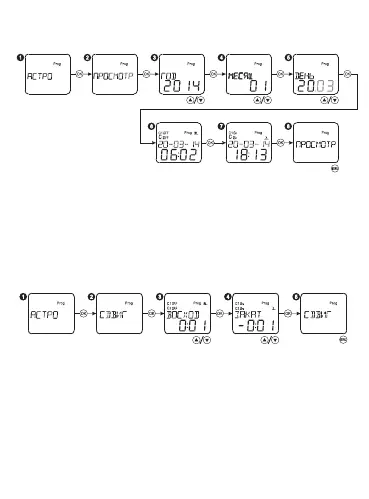
In order to view the astronomical time on a specied day:
Select the mode ASTRO and press «OK». Then select the menu
item VIEW and press «OK». Select the year with the buttons «▲▼»
and press «OK». Select the desired month and day in the same way.
If you press the buttons «▲▼» for a long time (more than 0,5 s), the
values will be changed quicker. After that press the button «OK»
sequentially to view the sunrise/sunset time on a specied time.
Press the button «OK» to return to the main menu.
Select the mode ASTRO and press «OK». Select the menu item
OFFSET and press OK. Select the sunrise offset time with the
buttons «▲▼» and press OK. Select the sunset offset time in the
same way. If you press the buttons «▲▼» for a long time (more
than 0,5 s), the values will be changed quicker. Range of time offset
is ±2h. Press the button MENU to return to the main menu.


 To Next Page