8
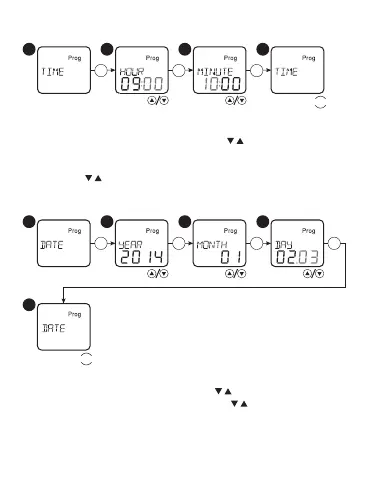
CURRENT DATE Setting :
1
5
2 3 4
OK OK OK OK
MENU
Select in the main menu the option «DATE», press the button «OK».
Set the current year, month, day with « ». Use the button «OK»
to go to the correct option. If you press « » for more than 0,5
s, the value will be changed quicker. Press «MENU» for exit from
settings.
Current time setting:
OK OK OK
MENU
Select in the main menu the option «TIME», press the button «OK».
Set the current hour and minute with « ». Go to the correct
option by pressing the button «OK». If you press the button (more
than 0,5 s), the value will be changed quicker. Press the «MENU»
for buttons « ».


 To Next Page