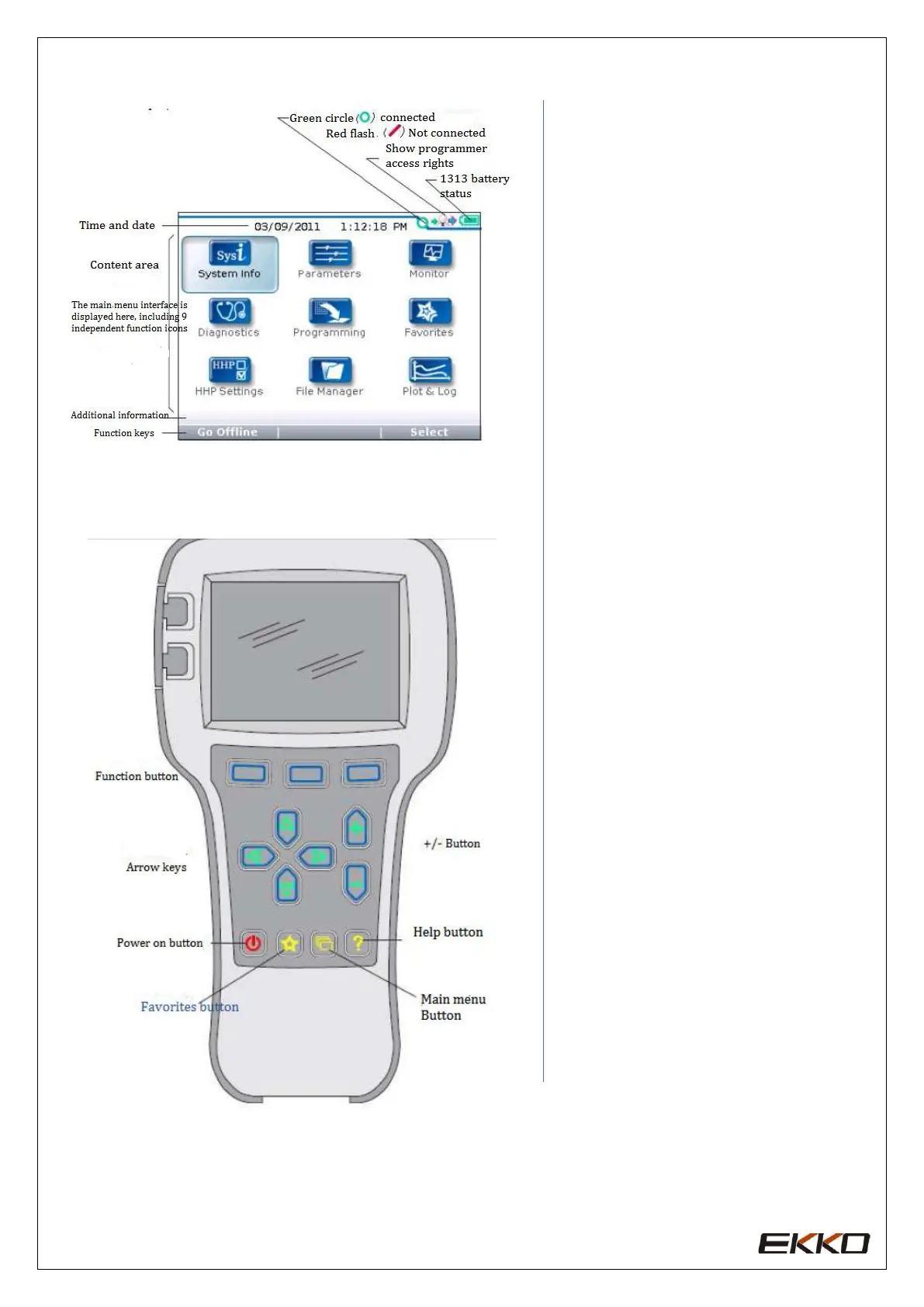
Function keys
Since the functions of these three
buttons are determined according to
the specified content, these three
buttons are blank. At any given time,
the function of the button will be
displayed on the upper LCD screen.
Arrow keys
The displayed information can be
selected up, down, left, and right
through the 4 Arrow keys .+/-keys
The parameters can be added or
decrease through these 2 keys. At
the same time, "+" can mean "Yes" in
operation, and "-" can mean "No". In
some cases, it can also be used as a
scrolling option.
Power button
When the programmer is inserted
into a power-on controller, the
programmer does not have to press
the power button to use it, and the
programmer will automatically turn
on. After pressing for a few seconds,
the programmer will prompt
whether it needs to be turned off.
You can decide whether to turn off
by selecting "Yes" and "No"
represented by the function keys.
After closing the programmer, press
for a few seconds, the programmer
will restart.
Favorites button
There are two ways to enter the
favorites menu, you can enter
through "Favorites" in the main
menu, or you can press this key to
enter



 To Next Page