Display Mode
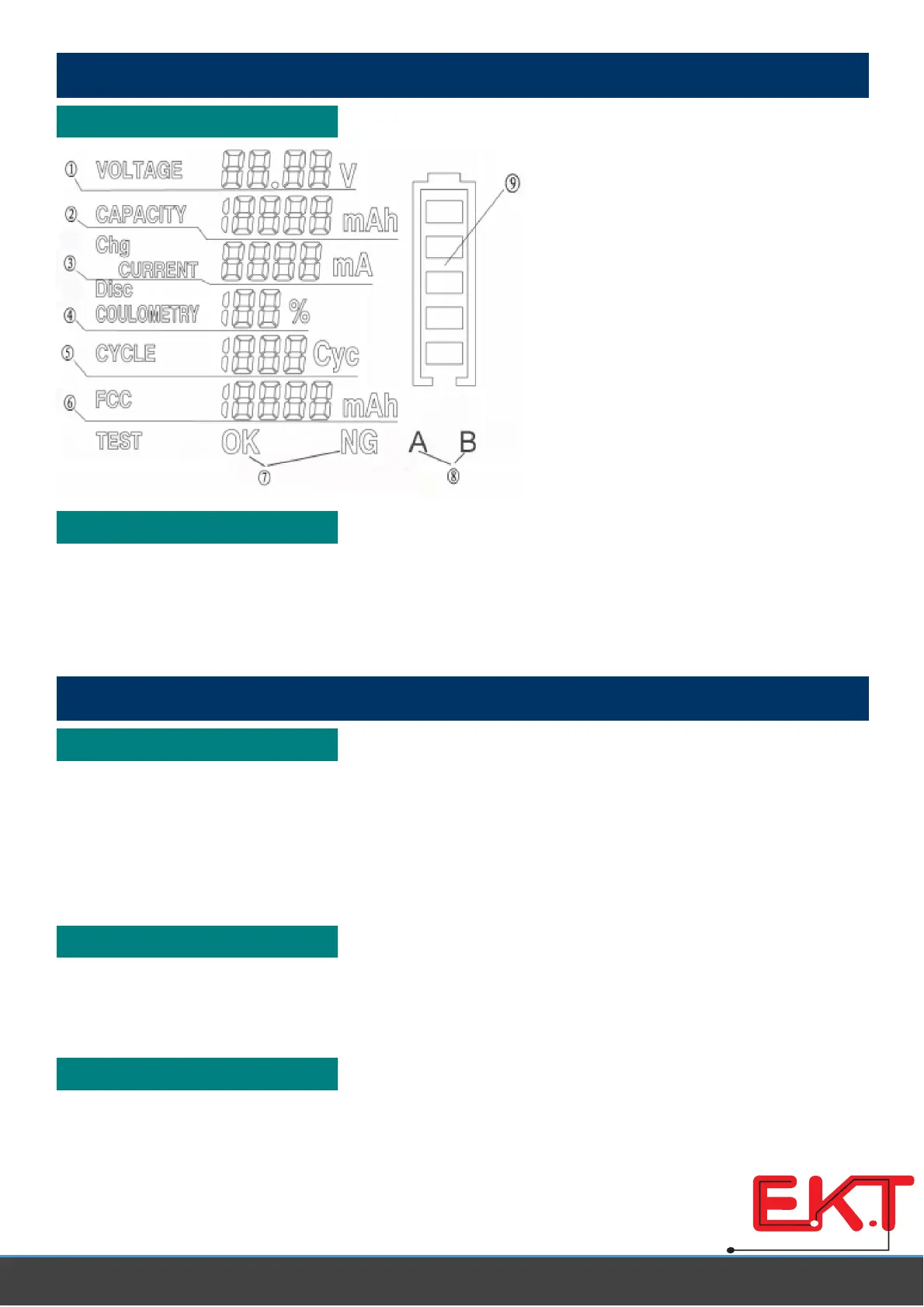
LCD Display
①
Battery voltage
②
Remaining capacity
③
Charging current or discharging
current
④
Remaining capacity percentage
⑤
Charge / discharge cycle count
⑥
Full charge capacity
⑦
Test result
⑧
Channel indication
⑨
Battery bar
LED Indication
Shine in red colour: On charge or discharge
Flicker in red colour: Trouble alarm
Shine in green colour: Charge finished
Operation
Power Up
1) Connect the adapter to AC power source
2) Connect the tester with the adapter
LCD shows battery information and LED lights up for a moment if a battery has been connected to the
tester.
Both LCD backlight and LED lights up for a moment if no battery has been connected to the tester.
Connecting Battery
◇
Make sure the connecting wire fits the battery
◇
Make sure the connecting wire is plugged into the battery socket in correct direction
◇
Make sure no poor connections
Charge
◇
Normal charge
Tester starts to charge your battery after you press the charge button. Battery information will be showed
www.ekt2 .com
Electronics
Katrangi
Trading



 To Next Page