Model : DCB41
UPDATE ONLY
HDMI (ARC)
1938 N. Batavia St.
Suite K
Orange, CA, 92865
Fraunhofestrabe 16
24118 Kiel, Deutchland
SERIAL NUMBER
USB OPT SUB OUT
PHONO
ON/OFF
CAN ICES-0003(B)/NMB-003(B)
FCC ID: XXX-XXXXX
IC: XXXXX-XXXXX
Desinged by Elac
Made in China
SPEAKER OUT
120-240V~50/60Hz AC
80W
L/R
GND
OUT
SPEAKER
ELAC DEBUT ConneX DCB41 | www.elac.com | Page 4
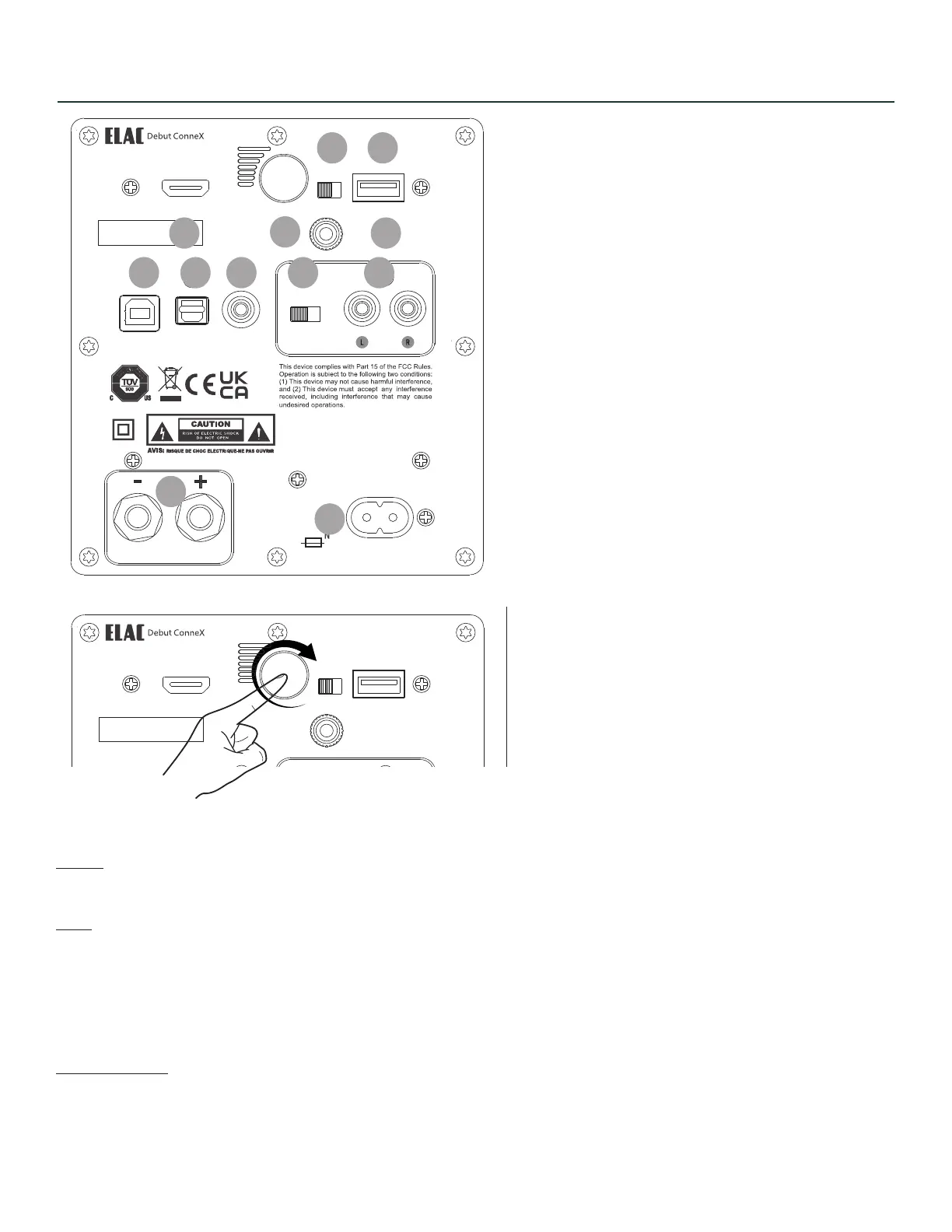
1. AC Mains Inlet
2. HDMI (ARC) Input
3. Volume/Power/Source
4. L/R switch
7. USB Audio Input
8. Optical Input
9. Subwoofer Output
10. Phono/Line Switch
Controls and Inputs/Output
5. USB for Update
6. Ground Screw Terminal
11. Phono/Line Input
12. Speaker Output
The Volume knob can be used to adjust volume, change input and power on.
Rotate:
Rotating the knob will increase or decrease volume.
Push:
Press to turn on unit.
Press and hold in BT input to initiate pairing.
Press when unit is on to change input.
Front LED colours are: [BT - Blue] [HDMI - Green] [USB - White] [Optical - Red] [Phono - Pink]
Power/Standby:
The unit will standby after 15 minutes of no use. Pressing or rotating the volume knob as well as pressing power
button on remote will wake up unit.
2
3
4 5
6
7 8 9 10 11
12
Model : DCB41
UPDATE ONLY
HDMI (ARC)
1938 N. Batavia St.
Suite K
Orange, CA, 92865
Fraunhofestrabe 16
24118 Kiel, Deutchland
SERIAL NUMBER
USB OPT SUB OUT
PHONO
ON/OFF
CAN ICES-0003(B)/NMB-003(B)
FCC ID: XXX-XXXXX
IC: XXXXX-XXXXX
Desinged by Elac
Made in China
SPEAKER OUT
120-240V~50/60Hz AC
80W
L/R
GND
OUT
SPEAKER
1


 To Next Page