10
Installation
Ampli er Location
Beforemakinganyconnections,besuretolocatetheEA101EQ-Gonastable,atsurface
suchasashelfortabletop.Provideenoughspacearoundtheamplierforthefreeowof
air, and do no block any of the vents on the bottom, sides or top, particularly if the amp is
going to be located in a cabinet or closet. Leave enough space around the amp for the
wires that are connected to the amp and other devices and do not allow the wires to block
theventsorthefreeowofairaroundtheamp.Donotexposetheamptodirectsunlight.
SPEAKER OUT
RIGHT LEFT
RESETUSB IN
OPTICAL
IN 2
OPTICAL
IN 1
SERVICE
COAX INSUB OUTLINE IN
1
LINE IN
2
L
R
100-120V/220-240V
~50/60Hz 1.6A
CAUTION: FOR CONTINUED PROTECTION
AGAINST RISK OF FIRE,REPLACE ONLY
WITH SAME TYPE FUSE AND RATING.
ATTENTION: UTILISER UNE
FUSIBLE DERECHANGE
DE MEME TYPE ET CALIBRE.
SERVICE
RESET
LFE IN
POWER
100-120V/220-240V
~50/60Hz 2A
T2A L 250V
S10EQ HIGH PERFORMANCE SUBWOOFER
Designed in Cypress, CA
ELAC Americas LLC.
11145 Knott Ave. Suite E&F
Cypress, CA. 90630
Serial Number
MADE IN CHINA
Model: DS10EQ1-BK
CAUTION: FOR CONTINUED PROTECTION
AGAINST RISK OF FIRE, REPLACE ONLY
WITH SAME TYPE FUSE AND RATING.
ATTENTION: UTILISER UNE FUSIBLE DE
RECHANGE DE MEME TYPE ET CALIBRE.
CD PLAYER
OPTICAL COAXIAL
L R
LINE LEVEL OUT
MUSIC SERVER
OPTICAL COAXIAL
L R
LINE LEVEL OUT
BLU-RAY PLAYER
OPTICAL COAXIAL
L R
LINE LEVEL OUT
HDMI
Stereo Audio
HDMI
ELAC S10EQ SUBWOOFER ELAC B5 BOOKSHELF SPEAKERS
ELAC EA101EQ-G
INTEGRATED AMPLIFIER
CD Player
Music Server
Blu-ray Disc Player
Multi-media PC
HD Video Display
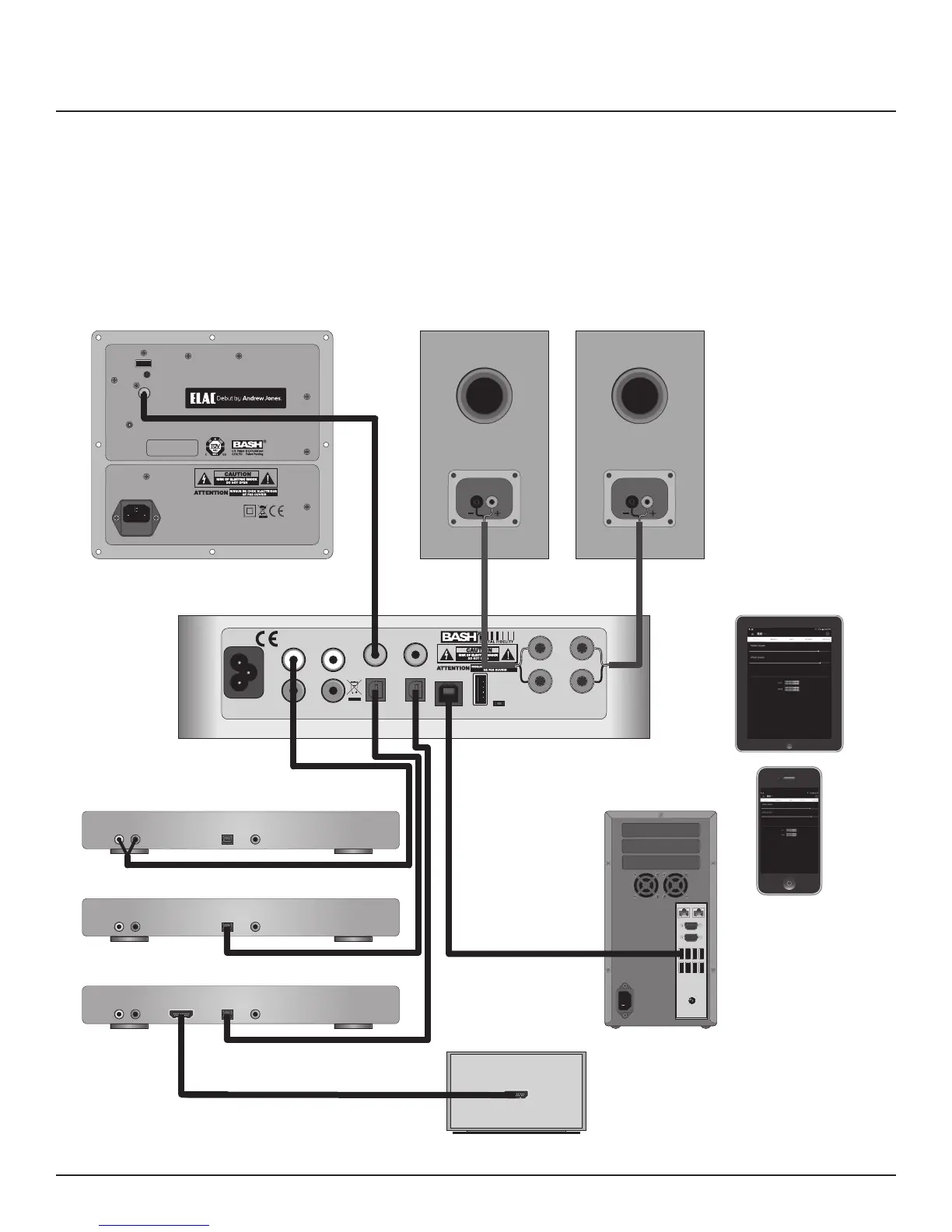
CD Player Line Out to Amp Line In
Server Optical Out to Amp Optical In
Blu-ray Optical Out to Amp Optical In
Blu-ray HDMI Out to TV HDMI In
PC USB to Amp USB
Android/iOS
Phone/Tablet
with Bluetooth
Running EA101EQ-G App
Figure 4 Typical EA101EQ-G System


 To Next Page