www.elationlighting.com
24 PLATINUM FLX™ User Manual
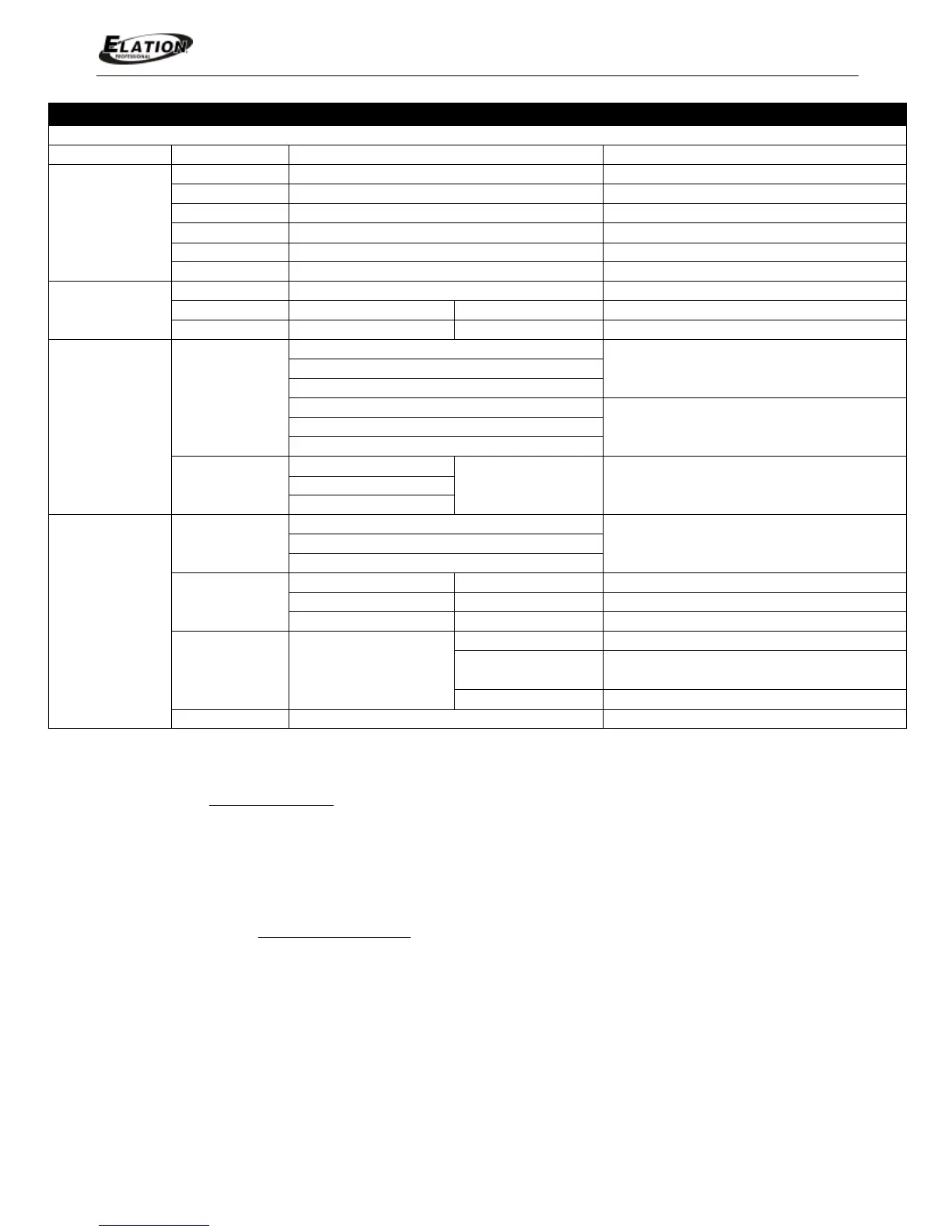
ELATION© PLATINUM FLX™ S Y S T E M M E N U
Supports Software Versions: ≥ 1.5.2
(Default Settings in BOLD)
Reset Function
Reset Pan&Tilt
Reset Pan/Tilt
Reset Gobos
Reset Gobos
Reset Shutter and/or Dimmer
Reset Others
Reset Other Motors
Effect Adjust
User Mode Set
User Mode
Standard Mode
DMX Channel Modes
Extended Mode
User Defined Channel Assignment User Mode B
Edit User Mode
Edit User Mode A
Max Channel = XX
PAN = CH01
Edits User Defined
Channel Assignments
Edit User Mode C
Edit Program
Select Program
Auto Pro Part1 = Program 1~10 (Program 1)
Select Programs To Be Run
Auto Pro Part2 = Program 1~10
(Program 2)
Auto Pro Part3 = Program 1~10 (Program 3)
Edit Program
Program 1 Program Test Testing Program
Program 10 Step 64=SCxxx Save and Exit
Edit Scenes
Scene 001
~
Scene 250
Save and Automatically Return
--Fade Time--
--Scene Time--
Manual Scenes Edit
Input By Outside Stores Scenes via Ext DMX Console
Automatic Scenes Recorder
FUNCTION - Auto Program
Define fixture mode (Master or Alone) for running Auto Programs. Select desired
internal programs under “Select Program”, set the number of steps under “Edit
Program”, and edit individual scenes under “Edit Scenes”.
LAMP CONTROL - Max ON at Temp
The fixture is designed to shut the lamp OFF when an excessive temperature is
sensed inside the head by the on-board CPU. The lamp is shut OFF to prevent
damage to the lamp and avoid possible internal damage to the fixture head.
This function sets the MIN internal operating temperature of the fixture head before
the lamp will restrike after the lamp has been automatically shut OFF.


 To Next Page