!
SWITCHES AND CONTROLS
JOYSTICK
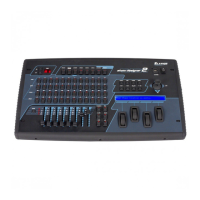
The joystick controls pan and tilt on all selected fixtures that have a pan or tilt feature. The
joystick is the “return to center” type so it operates by moving it in the desired direction. The
greater the joystick movement the faster the pan or tilt movement will be. The state of the
“fine” mode switch also determines the speed of the pan or tilt movement. If a fixture uses two
channels for pan or tilt (16 bit), the joystick will affect the fine channel with “fine” mode on. If
the fixture only uses 1 channel for pan or tilt, the movement will be slower allowing more
precise control with “fine” mode on.
FINE SWITCH
The fine button affects the way the joystick and the data wheels operate. With fine mode on,
they will increment or decrement by the smallest possible amount. With fine mode off, they
will increment or decrement by larger amounts. If a fixture profile is installed for a selected
fixture, selecting fine mode will switch the channel wheel display to number values instead of
name values such as color or gobo names. This can be useful for splitting colors or gobos.
BLACK SWITCH
Pressing the “black” switch will stop all activity and blackout all fixtures. Depending on the
type of fixture and its capabilities, black will only turn off the channel that controls the output
of the lamp but for some types of fixtures will set all channels to 0. The “black” LED will
remain on to indicate that a blackout was called. Pressing the “black” switch a second time will
turn the LED off and restore the blacked-out channels to their previous settings.
Clear All: Pressing and holding the “black” switch for 2 seconds will force all DMX channels to
0 and clear the scene buffer. This function is useful when programming new scenes. You can
also select a starting or “home” scene that will be called whenever you use this function. Refer
to the menu section of this manual under “Select Home Scene” for instructions on how to do
this. You can use any scene that you have already saved as the home scene.



 To Next Page