2. Operation Guide
6
2.2 Switch Pack Mode
2.3 Dimmer Pack Mode
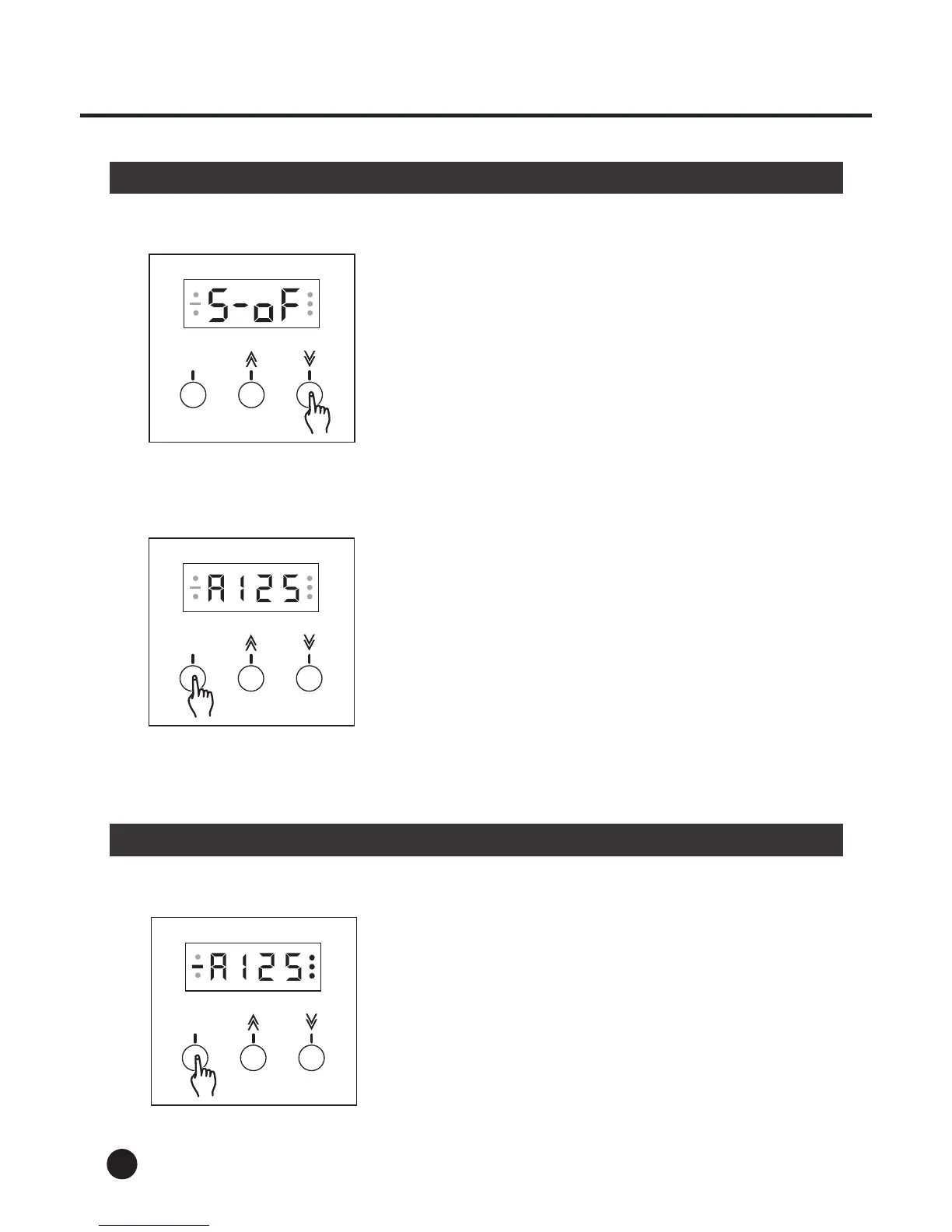
4. Tap the Up or Down button to change between
"Switch On" and "Switch Off".
If there is no timely operation on any of the fun-
ction button, the unit will automatically return to
the DMX Address function mode.)
5. Once the Switch Pack is selected, press Menu
button to return to DMX Address mode.
1. Press Menu button to enter next item.
MENU
MENU
MENU
MENU
7
2. Operation Guide
2.3 Dimmer Pack
2. Tap the Up or Down button causing the Segment
Display shows "d---".
3. Then press Menu button to enter Dimmer Limit
mode.
5. Press Menu button to enter Dimmer Preset mode.
4. Tap the Up or Down button to change the value
within the range of 10-100. Each tap will change
the value once, pressing and holding down will
change the value quickly. The Dimmer Limit level
will be stored into memory automatically.
MENU
---
MENU
MENU
( If there is no timely operation on the button for
more than 20 seconds, the unit will return to DMX
Address function mode again.)



 To Next Page