10
Using your dishwasher
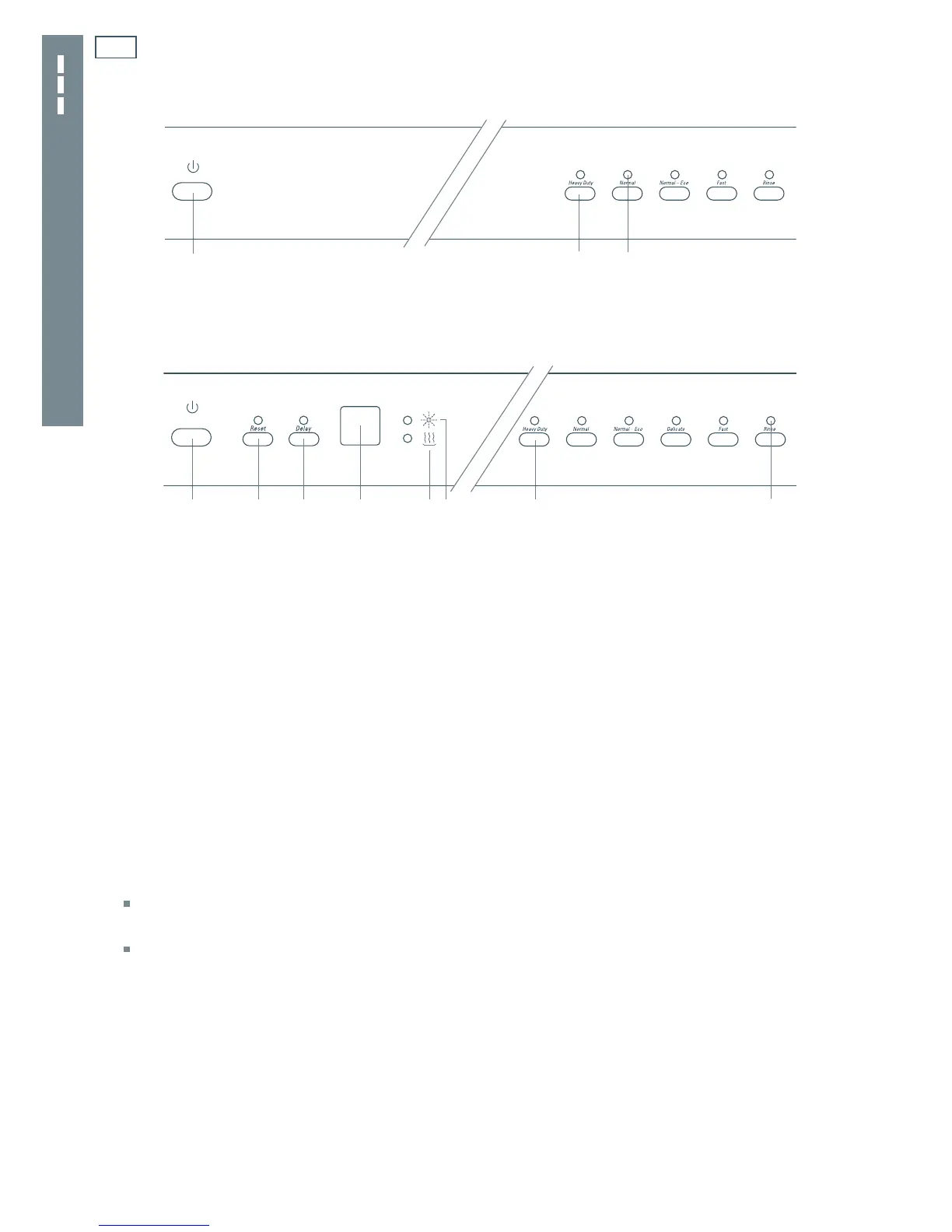
DW60CS AND DW60CD MODELS
a
Power button (ON/OFF)
b
Programme button
c
Programme indicator
a
b
c
a
a
Power button (ON/OFF)
b
Reset button
c
Delay start button
d
Time remaining indicator
e
Heater indicator
f
Rinse aid indicator
g
Programme button
h
Programme indicator
Quick start
1
Remove all food scraps and load the dishes.
2
Add detergent.
3
Check rinse aid.
4
Check that there is nothing obstructing the spray arms.
5
Close the door.
6
Press the Power button to turn the dishwasher on.
All the programme indicators will light up.
7
Press a programme button to select a wash programme.
After five seconds, the selected programme indicator light will start flashing, the
dishwasher will beep once and the wash programme will start automatically. The Time
remaining indicator will display the estimated time for the programme (DW60CD models
only).
At the end of the wash programme, your dishwasher will beep six times, and all the programme
indicators will light up.
8
Open the door and leave it slightly ajar to improve the drying performance.
9
After several minutes, press the Power button to turn the dishwasher off.
10
Remove dishes once they are cool enough to touch.
Fig. 2 Control panel for DW60CS models
Fig. 3 Control panel for DW60CD models
bc efdg h



 To Next Page