14
Using your dishwasher
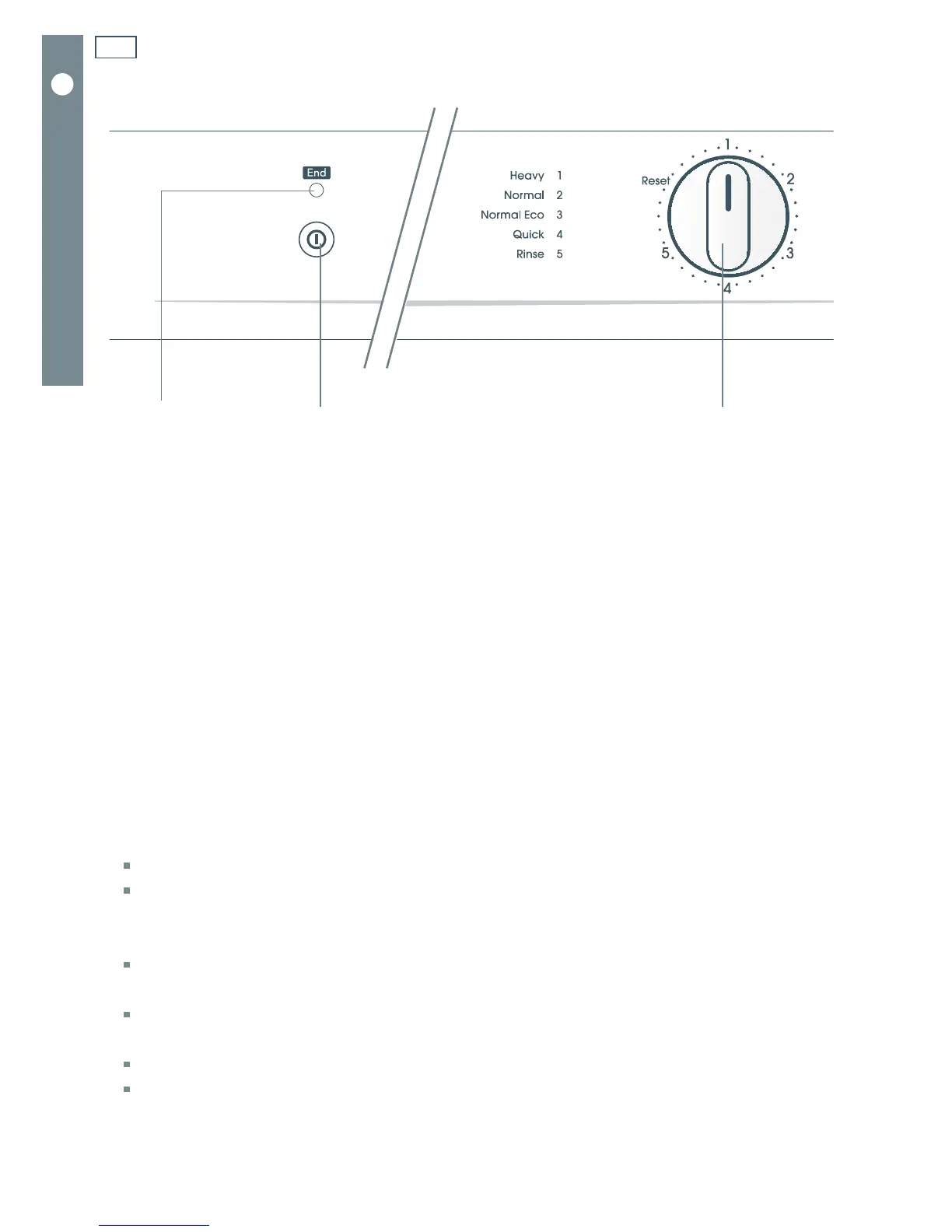
DW60CR MODELS
‘END’ light
- if flashing:
a wash programme is
underway
- if steadily lit:
a wash programme has
ended or paused, the
dishwasher is on
Programme dial
Turn to align with a
number to select a
programme
Power button
(ON/OFF)
Quick start
1
Remove all food scraps and load the dishes.
2
Add detergent.
3
Check rinse aid.
4
Check that there is nothing obstructing the spray arms.
5
Close the door.
6
Turn the water supply on.
7
Press the Power button to turn the dishwasher on.
The “End” light will come on.
If the dishwasher is beeping, close its door properly.
8
Turn the Programme dial to select the desired programme, making sure that the mark on the dial
perfectly aligns with the programme number.
If the dial is already pointing to the programme number you want to run, you will have to
turn it to “Reset” first and then back to the desired number.
If you have turned the dial past the desired number, turn it back to “Reset”, then back to
the number.
After three seconds, the “End” light will start flashing and the wash programme will start.
Note: the dial will not rotate as the wash programme progresses.
At the end of the wash programme, you dishwasher will beep six times and the “End”
light will stop flashing and be steadily lit.
Fig. 4 Control panel for DW60CR models



 To Next Page