4
PRODUCT DESCRIPTIONS
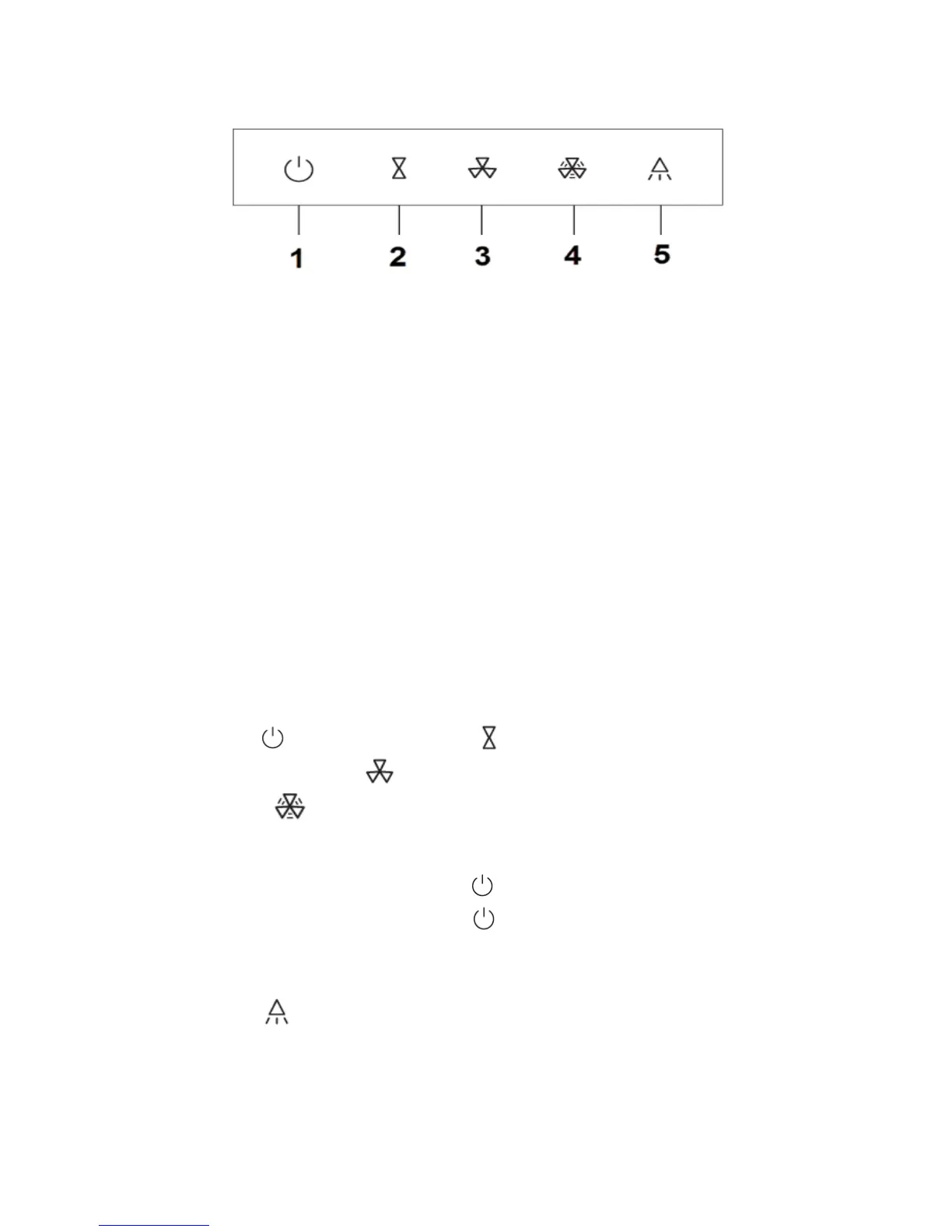
1 Switch/Delay Function – To switch the cooker hood to standby mode and turn
off the cooker hood. Press this button during operation to schedule three
minute delay timer to turn off the cooker hood.
2 Low Fan Speed – Press this button to operate low fan speed.
3 High Fan Speed – Press this button to operate high fan speed.
4 Turbo Fan Speed – Press this button to operate turbo fan speed for one
minute (after one minute will revert to high fan speed).
5 Lamp Illumination – To switch on/off the LED lamp.
OPERATING INSTRUCTIONS
1 Press the button and press the button to operate the cooker hood in
low speed. Press the button to operate the cooker hood in high speed.
Press the button to operate the cooker hood in turbo speed. This
function will revert to high speed after one minute.
2 When the motor is running, press button to schedule the cooker hood to
turn off after three minutes. Press button again when the cooker hood in
delay off mode to turn off the cooker hood immediately.
3 Press the button to turn on the LED lamp. Press again to turn off. (This
function does not relate to the cooker hood motor).


 To Next Page