9
3
4
No step by step logic for pneumatic bar
If on terminals n 10-11 you connect a pneumatic bar,
when the bar is pressed the gate reverse the movement
for 1,5 second then stop.
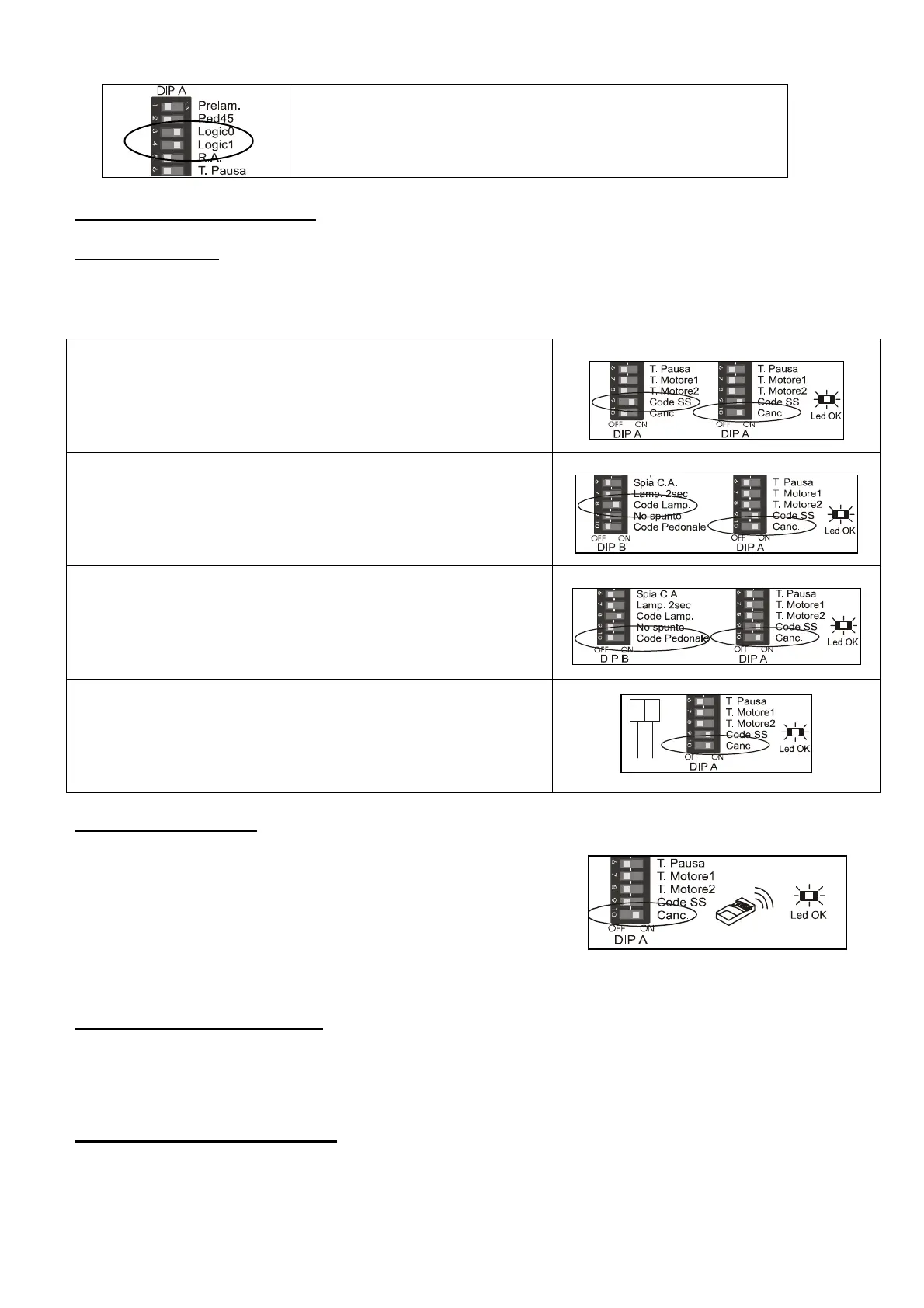
<I> RADIO CODE ERASING
- erasing all code.
I1. if you make the RESET function, all code are erasing and the BASIC CODE come back in
memory.
Erasing Start/Stop code
I2. set the DIP A9 in ON position
I3. set the DIP A10 in ON position, the Led OK make a
flash.
I4. set the dips A9 and A10 in OFF position
1 Flash
9
10
Erasing courtesy lamp code
I5. set the DIP B8 in ON position
I6. set the DIP A10 in ON position, the Led OK make a
flash
I7. set the dips DIP B8 and A10 in OFF position
1 Flash
10
8
Erasing walk-way code SS2
I8. set the DIP B10 in ON position
I9. set the DIP A10 in ON position, the Led OK make a
flash.
I10. set the dips B10 and A10 in OFF position
1 Flash
10
10
Erasing stop code
I11. open the contact on terminals n 13-14.
I12. set the dip A10 in ON position, the Led OK make a
flash.
I13. close the contact on terminals n 13-14.
14
13
Com
Stop
1 Flash
10
Erasing just one code.
.
-- set the DIP A10.in ON position
-- send a code already in memory, this code will be erasing
the Led OK make a flash.
-- set the DIP A10.in OFF position
1 Flash
10
<L> PRE-FLASHING DIP A1
-- Set and leave the DIP A1 in ON position, the pre-flashing is 3 seconds.
<M> 45° WALK-WAY DIP A2
-- set and leave the DIP A2 in ON position.


 To Next Page
 Loading...