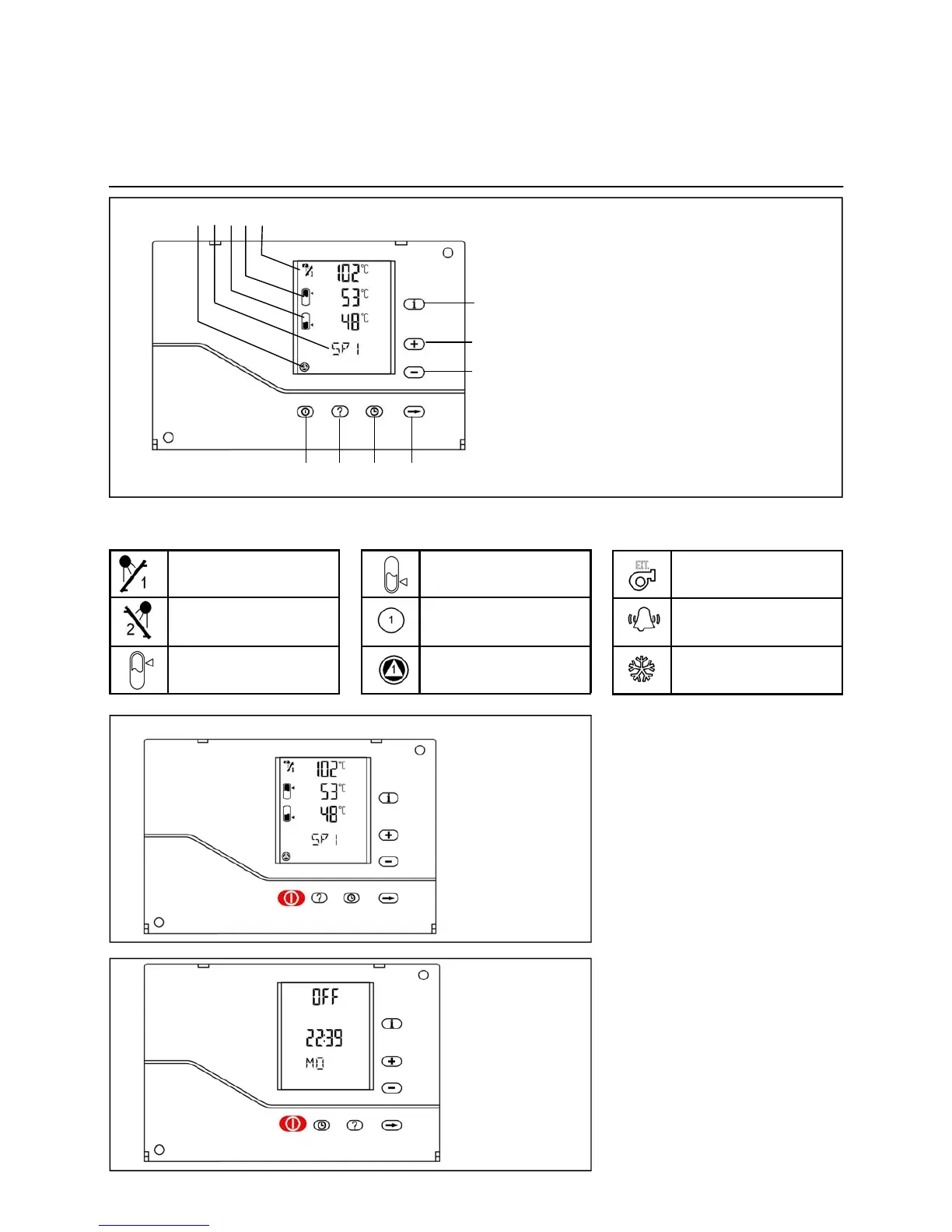
1 pump operation indicator
2 item identifier
3 lower storage tank return temperature
4 upper storage tank temperatures
5 collector temperatures TCI and TC2
6 information
7 "increase" key
8 "decrease" key
12 next
11 time of day
10 timer settings
9 on / off switch
1 2 3 4 5
9 10 11 12
6
7
8
Icons displayed on LCD screen
9
Controller ON / controller OFF
When the controller is switched on,
the display is "normal". The collector
temperature and the upper and lower
storage tank temperature of the (first)
storage tank can be viewed at a glan-
ce.
When the controller is turned off, the
display shows "OFF", the time of day
and the day of the week.
The controller can be switched off by
pressing the [On/Off] key for five se-
conds.
Controller operation
Turning the controller on and off
First collector tempera-
ture
Second collector tempe-
rature
Upper storage tank tem-
perature
Lower storage tank tem-
perature
Pump ready
Pump on
Backup heating
Alarm
Freeze protection


 To Next Page