8-2
HOW TO USE YOUR CARAVAN’S EQUIPMENT
CONTROL PANEL
Operating Instructions
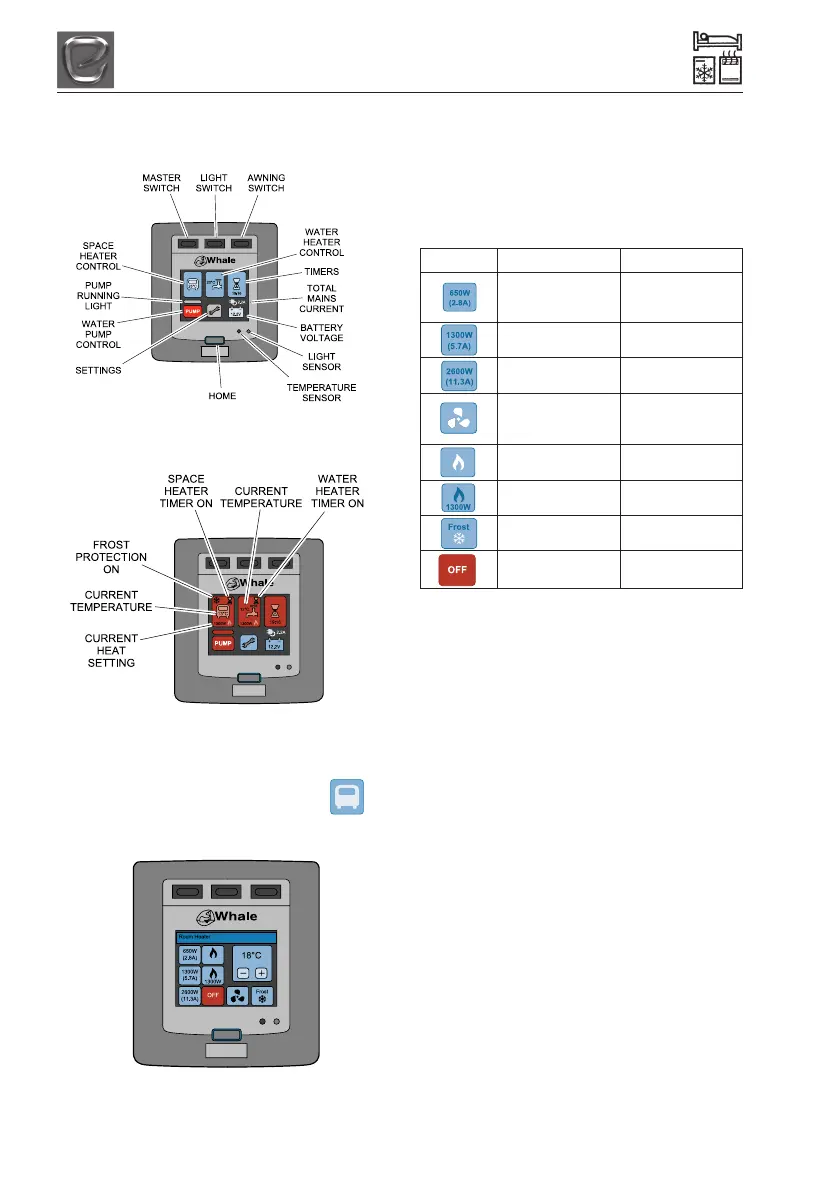
Fig 1 Home Screen
Operating the Spacer Heater
1. From the home screen, touch the
‘van’ icon:
2. The following screen will appear:
Fig 3 Space Heater Functions
3. Select the desired heat setting by tapping
one of the following icons; the icon will
turn red to show it has been activated.
Note: The heater will not operate if the
desired temperature is below the current
room temperature.
Icon Settings Description
Low electric
650W (2.8 Amps) setting, quiet night
time setting*
1300W (5.7 Amps) Medium electric
setting
2600W (11.3 Amps) High electric
setting
Fan Only Cold air circulation
(Only when gas is
turned off)
Gas Only Cold air circulation
only
Gas and 1300W Maximum heat
setting**
Frost Frost Protection
Setting ***
Off Turns Spacer
Heater Off
*Night Time Setting: For quiet night time
operation and to reduce energy consumption.
Select 650W and a lower temperature.
**Maximum Heat Setting: This uses gas and
electric simultaneously for higher heat
outputs. It intelligently balances between gas
and electric settings, varying the heat output
accordingly to maintain the selected room
temperature.
***Frost Protection Setting: This uses a
small amount of power to maintain a very low
temperature in the van.
4. Select the desired room temperature
(ranges from 18ºC to 35ºC) using the +
and - buttons.
5. Once the desired heat setting has been
activated, press the home button to return
to the home screen.
Fig 2 Home Screen Functions




 To Next Page