8-3
HOW TO USE YOUR CARAVAN’S EQUIPMENT
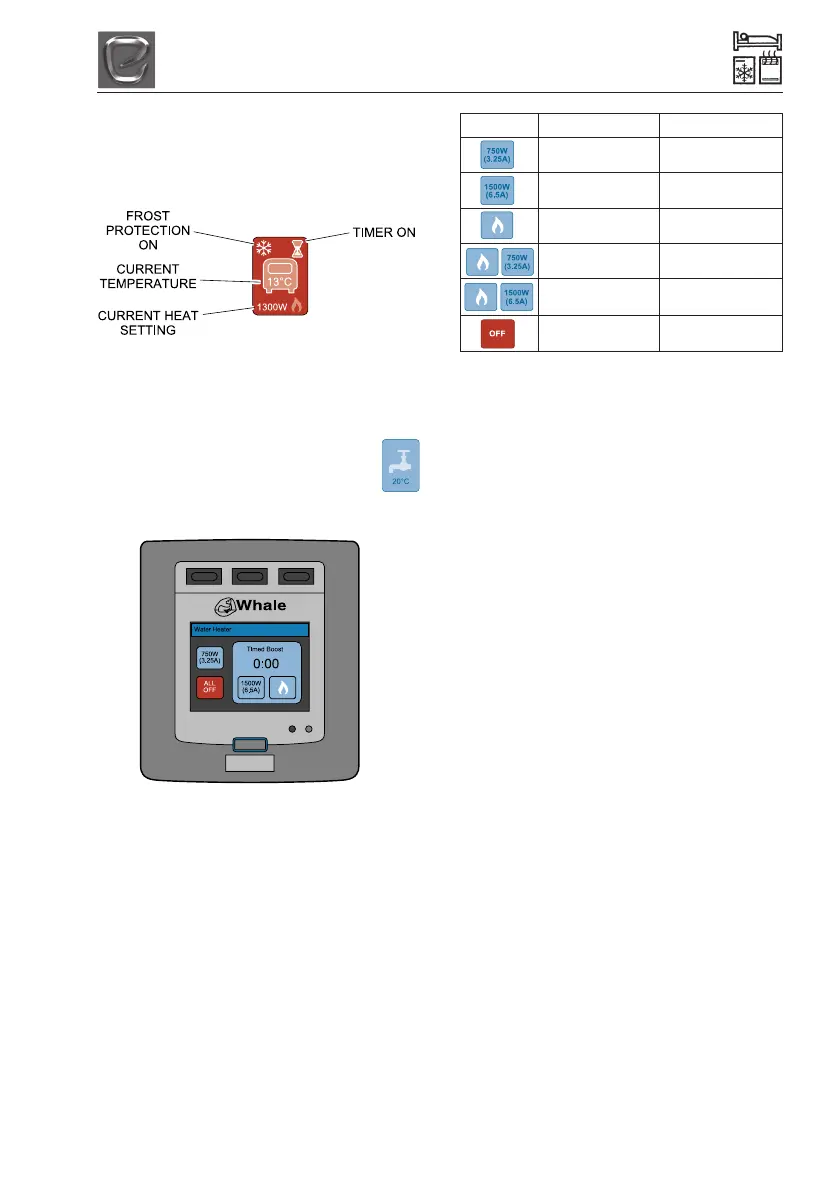
The home screen will now show the ‘van’
icon in red with the selected heat setting
displayed.
Operating the Water Heater
1. From the home screen, touch the
‘tap’ icon:
2. The following screen will appear:
3. Select the desired setting by touching
one of the following icons. The icon will
turn red to show it has been activated.
Fig 4 Water Heater Functions
Icon Settings Description
750W (3.25 Amps) Low electric
setting*
1500W (6.5 Amps) High electric
setting**
Gas Only Gas setting
no electric**
Gas and 750W Low gas and
electric setting**
Gas and 1500W High gas and
electric setting**
Off Turns heater off
*Low electric setting: This uses 750W
(3.25A). Unlike the heat boost settings**, the
low setting does not operate on a timer,
therefore the timer function will remain at 0.
When this setting is enable the water heater
will remain CONSTANTLY ON until all water
heater settings are turned off. The low
electric setting is best used when the vehicle
is connected to a mains supply with limited
current capacity.
NB: Running several appliances at once will
increase the current drawn by the van, which
depending on the rating of the circuit breaker,
could trip the supply. If several appliances
are running at the same time, the low electric
setting can be used to heat the water but with
a reduced current draw. Please note the
calculated amp value on the iVan control
panel only shows the current drawn by the
Whale heating system and does not measure
other appliances within the van.
**Heat Boost settings: There are a number
of settings which can be used depending on
the desired power/gas usage and the
required heat up time. When using any of
these combinations the timer will count down
for 15 minutes (default). If a larger supply of
hot water is required, over a longer period of
time e.g. if 3 or more showers are required in
quick succession, the timer function can be
changed to 30 mins, 45 mins, 60 mins or
forever.
NB: After the boost time has reached 0, the
water heater will automatically return to the
previous setting.
To change the default timer function, touch
the spanner icon on the home screen, then
the options icon and use the arrow keys to




 To Next Page