5
KX3-2M/4M Tuning
Tap the BAND+ or the BAND˗ switch to select the 2 or 4 meter band, depending upon which transverter
you have installed.
As on HF, the KX3 tuning can be done using direct frequency entry or with the VFO knobs. For FM
communications you may find tuning more convenient to switch the tuning rate to 5 kHz steps: hold KHZ
to switch the tuning rate. Tap
RATE to restore finer tuning steps. This tuning rate is determined by the
VFO CRS setting in the menu. It is per-mode and can be set to a convenient value for each mode using the
menu. The default values are 5 kHz in FM mode, 500 Hz in SSB (USB or LSB), 100 Hz in CW and 1 kHz
in AM. See VFO CRS under Menu Functions in your KX3 Owner’s Manual for information about
changing the default step sizes.
To make a direct frequency entry, tap
FREQ ENT, then enter 1 to 3 MHz digits, a decimal point, and 0 to 3
kHz digits, followed by tapping . . . (Note that the 7, 8 and 9 number switches are activated by tapping
the AF/RF-SQL, PBT I/II, and KEYER/MIC encoder knobs.)
The following sections describe how to store frequencies in memory for quick QSY. For repeater operation
the PL tones and offsets are also stored so you can switch to a repeater channel and be ready to
communicate with a few simple key presses. Also you can have the KX3 scan preselected channels stored
in memory and monitor a second frequency, such as a repeater input frequency, for activity.
FM Operation
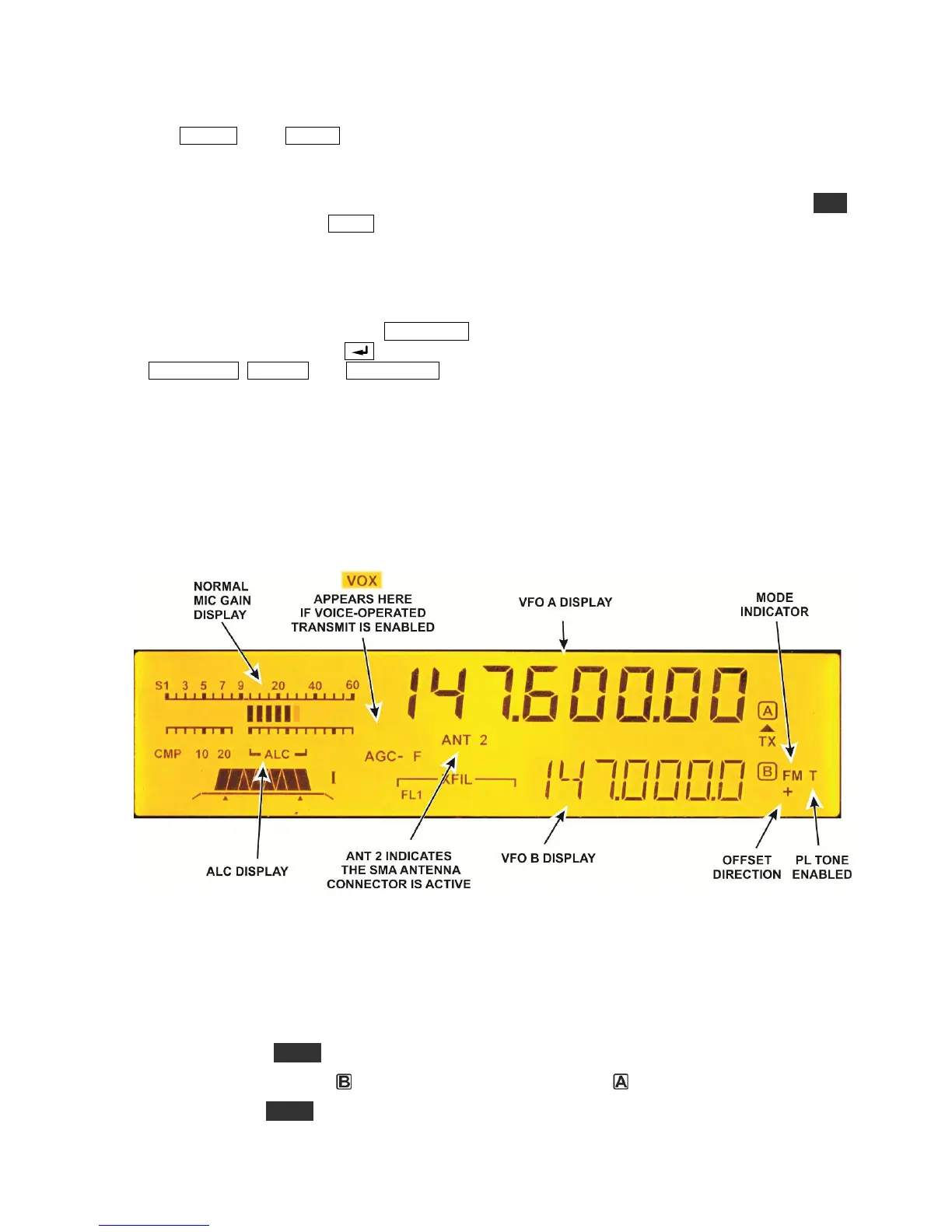
Figure 1 shows the KX3 LCD identifying only those elements mentioned in the this text. See your KX3
Owner’s manual for a complete description of the display.
Figure 1. KX3 Display.
Basic Setup
Set up your KX3 for FM operation on 2 or 4 meters as follows.
Enable FM mode as follows. This need be done only once. FM mode will remain on unless you
re-enter the menu and turn it off.
o Hold MENU.
o Turn the VFO
knob to FM MODE and turn the VFO
knob to
On.
o Tap MENU to exit the menu.



 To Next Page