8
Manual Frequency Entry
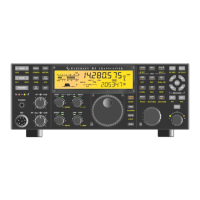
You can set up the KX3-2M or 4M for repeater or simplex operation and store the information in the
KX3’s memory without a computer as follows:
Select FM mode: tap
MODE as needed so FM appears on the right end of the LCD.
Enter the KX3 transmit frequency using the VFO knob or with direct frequency entry. For
operation with a repeater this will be the repeater input frequency.
For operation with a repeater, select the correct offset (difference between repeater input and output
frequencies), offset direction (repeater input frequency above or below the output frequency) and
the PL tone frequency (if needed) as follows:
o The default offset is 600 kHz. You can check the value and change it as needed: hold
MENU and select RPT OFS with the VFO knob, and then use the VFO knob to select
the correct offset value displayed in kHz. Tap MENU to exit.
o Hold ALT repeatedly as often as needed until TX + X.XX appears on the LCD VFO B area
if the repeater input frequency (KX3-2M or 4M transmit frequency) is higher than the
repeater output frequency or until
TX – X.XX appears if the repeater input frequency is
lower than the repeater output frequency. The
X.XX is the offset (difference between
repeater input and output frequencies) that you entered above. The + or – sign, indicating
the direction of the repeater offset, will appear below
FM on the LCD.
Be sure you select the correct sign ( + or – ) that corresponds to the direction of
the repeater offset. If you selected the wrong sign, you can change it by holding
REV.
o If the repeater requires a PL tone, hold PITCH. The VFO B area of the LCD will show PL
OFF
or PL X.XX, where X.XX is the PL tone frequency. This is a toggle that alternates
between tone off and tone on. To change the PL tone frequency, turn the
KEYER/MIC knob
to step through the standard tone frequencies. Tap MENU to exit. Selecting the 1750 Hz PL
tone frequency adds a 0.5 second tone burst to the beginning of each transmission (for
European repeaters). Holding PITCH while transmitting extends the tone indefinitely.
Hold STORE and then use the VFO knob to locate the desired memory location shown in the
VFO B area of the LCD. Hold STORE again or tap any switch to cancel. To recall previously-
saved data, hold RCL (recall) and use the VFO
knob to select the desired memory location. Tap
any switch to exit.
If desired, add labels to each memory location or edit an existing label as follows:
o Hold RCL (recall) and use the VFO
knob to select the desired memory location.
o Turn the VFO
knob. A cursor will appear to the right of the memory number on the
LCD. If no label has been stored before, a series of dashes indicating the 5 available
character locations will appear.
o Turn the VFO
knob to step through the available characters (A-Z, 0-9 and various
symbols) to choose the first character.
o Hold STORE to store the label.


 To Next Page