1.3 Product Appearance And Description
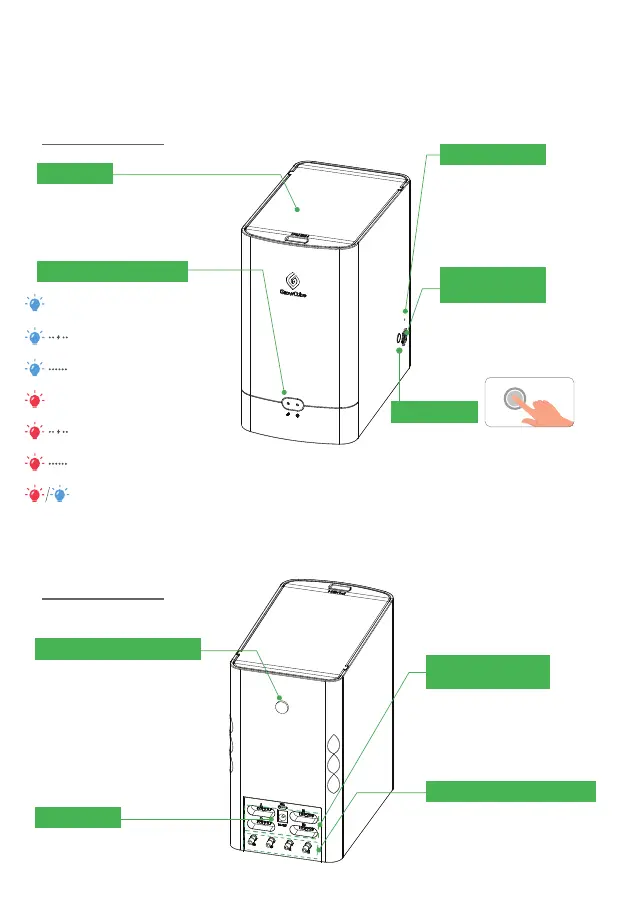
• 1.3.1 Host Appearance
Water Tank
Press to open and close, maximum water
capacity is 1.5L.
Reset Button Hole
Press and hold the reset
button with something
like a needle for 3 seconds
then restore GrowCube to
factory settings.
Temperature And
Humidity Sensor
Measure the ambient
temperature and humidity of
GrowCube.
Unlock Button
Network successfully connected
Network Connecting
Network connection failed
Sensor abnormality
Water outlet is blocked
Water shortage
Waiting for network configuration
GrowCube will be locked when the
blockage occurs or the water tank is
empty or the sensor is abnormal for more
than 3 times. After troubleshooting or
adding water, press the unlock button to
restore normal operation of the device. If
you hold down the button for 3 seconds,
the network will be reconfigured.
External Water Tank Hole
When an external large water
tank is required, using a water
pipe to connect the external
water tank from this hole.
Water Outlet Interface a/b/c/d
Independent four water outlets.
Using water outlet and soil
moisture sensor in pair.
A-a,
B-b, C-c, D-d.
Soil Moisture Sensor
Interface A/B/C/D
Interfaces for independent
4-way soil moisture sensor
Power Supply
12V/2A power adapter interface.
Working Status Indicators
03



 To Next Page