
 Need help?
Do you have a question about the Electro-Harmonix S9 string ensemble and is the answer not in the manual?
Connect power, instrument, and amp. Set controls, select preset, and engage.
Consult suggested factory settings and download a blank PDF for custom settings.
Warning about using the correct 9VDC power supply to prevent damage and voiding warranty.
Details the DRY VOL, EFFECT VOL, CTRL 1, CTRL 2, and PATCH knobs.
Internal switch to select dry signal or mute output during bypass.
Descriptions for SYMPHONIC, JUNE-O, PCM, and FLOPPY presets detailing their sounds and controls.
Descriptions for AARP and CREWMAN presets, including their emulated synths and control functions.
Descriptions for ORCH FREEZE, SYNTH FREEZE, and VOX FREEZE presets with Freeze function details.
Visual guide to recommended knob positions for all 9 presets.
Freeze function is available on patches 7-9. CTRL 2 controls Auto/Manual Freeze selection.
CTRL 2 CCW enables Auto Freeze. LED blinks until a note is played, then doubles speed.
CTRL 2 CW enables Manual Freeze. Notes freeze when played after entering effect mode.
Press footswitch to enter bypass to stop and reset the Freeze effect.
Use STRING9 as the first pedal. Place distortion/modulation/delay/reverb after it.
Avoid distortion/overdrive before STRING9 to prevent signal muddying and instability.
Use strong bridge pickup, volume at 10. Consider clean boost for low output pickups.
Connect EFFECT OUTPUT to a keyboard amp, PA, or mixing console for best hi-fidelity sound.
Indicates the pedal provides a buffered signal when in bypass mode.
The input impedance of the STRING9 pedal is 1 megaohm (1ΜΩ).
The output impedance for both the DRY and EFFECT output jacks is 500 ohms (500Ω).
The STRING9 pedal requires a current draw of 100 milliamperes (100mA).
Register online or return card within 10 days for repair/replacement warranty.
Contact EHX Customer Service for warranty repairs, obtain RA#, and include problem description.
Contact details for Electro-Harmonix service in the US/Canada and Europe.
Equipment tested per Part 15 FCC Rules for Class B digital devices, designed for residential protection.
Indicates product conforms to applicable European Conformity directives.
Indicates electronic components should be recycled at a proper electrical waste facility.
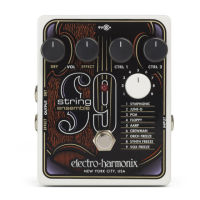
The Electro-Harmonix STRING9 String Ensemble is a guitar effects pedal designed to transform an electric guitar's sound into various string ensemble emulations. It allows guitarists to produce lush string lines and chordal string pads, similar to what other Electro-Harmonix 9-series pedals do for organs, electric pianos, and analog synthesizers. A key feature of the STRING9 is its ability to generate atmospheric pads, incorporating a groundbreaking Freeze algorithm from other Electro-Harmonix pedals like the HOG and Superego into three of its patches. The pedal is designed for ease of use, requiring no special pickups for clear polyphonic tracking, whether playing single notes or full chords.
The STRING9 offers nine distinct string ensemble patches, each with unique characteristics and adjustable parameters:
SYMPHONIC: Emulates a large symphonic orchestra, adding a lower octave to the bottom guitar strings for a fuller sound. CTRL 1 adjusts the tone, making the effect brighter when turned clockwise and darker when turned counter-clockwise. CTRL 2 controls sustain/release time, increasing the fade-out time as it's turned clockwise. This sustain/release effect manages fade-out volume rather than a reverb tail.
JUNE-O: Inspired by classic polyphonic analog synths from the early 80s. CTRL 1 is a tone control. CTRL 2 acts as an octave switch, allowing selection between five different octaves.
PCM: Recreates the sound of a smaller studio string section, reminiscent of vintage digital keyboards. CTRL 1 is a tone control. CTRL 2 adjusts vibrato depth, increasing it as turned clockwise and bypassing vibrato when fully counter-clockwise.
FLOPPY: Emulates mechanical string machines from the 1960s and 70s, such as the Mellotron® and Orchestron® (which used optical floppy discs). CTRL 1 is a tone control. CTRL 2 controls sustain/release time.
AARP: Emulates the beloved Arp® Solina string synthesizer. CTRL 1 adjusts the speed of a Small Stone Phase Shifter effect, increasing modulation speed clockwise and bypassing the phase shifter when fully counter-clockwise. CTRL 2 controls sustain/release time.
CREWMAN: Emulates the classic Crumar® Performer analog string and brass synthesizer. CTRL 1 sets the filter envelope sweep time and direction. In its counter-clockwise range, it adjusts the attack time of the filter sweep, while in its clockwise range (beyond "noon"), it controls the decay time. Sweep time becomes faster as the knob is turned clockwise in either section. CTRL 2 controls sustain/release time.
ORCH FREEZE: Combines an orchestra sound with a Freeze effect. CTRL 1 is a tone control. CTRL 2 selects between Auto Freeze and Manual Freeze modes, with the counter-clockwise half selecting Auto Freeze and the clockwise half selecting Manual Freeze.
SYNTH FREEZE: A string synthesizer sound with a Freeze effect. CTRL 1 is a tone control. CTRL 2 selects between Auto Freeze and Manual Freeze modes.
VOX FREEZE: Features Mellotron® choir and strings with a Freeze effect. CTRL 1 adjusts the speed of a Small Stone Phase Shifter effect. CTRL 2 selects between Auto Freeze and Manual Freeze modes.
The STRING9 is designed for straightforward operation. To begin, connect the provided power adapter to the 9V power jack. Plug your instrument into the INPUT jack and connect your amplifier or mixer to the EFFECT OUTPUT jack. For initial setup, set the DRY knob to minimum (fully counter-clockwise) and the other top-row knobs (CTRL 1, CTRL 2, EFFECT) to 12 o'clock. Select a preset using the PATCH knob (SYMPHONIC is a recommended starting point) and press the footswitch to activate the LED, indicating the effect is engaged. From there, you can play your instrument and adjust the controls to your preference.
The DRY VOL knob controls the volume of the untreated instrument signal that is present at the EFFECT OUTPUT jack. It does not affect the signal at the DRY OUTPUT jack. The EFFECT VOL knob controls the overall volume of the selected patch at the EFFECT OUTPUT jack.
The BYPASS Footswitch and STATUS LED toggle the EFFECT OUTPUT jack between buffered bypass/mute and EFFECT mode. The LED lights up when the pedal is in EFFECT mode. The STATUS LED also blinks to indicate it's waiting for a Freeze trigger or has received a new one.
Freeze Functionality: The Freeze function, available in patches 7-9 (ORCH FREEZE, SYNTH FREEZE, VOX FREEZE), allows notes and chords to sustain indefinitely, creating atmospheric pads. The Freeze algorithm acts on the string ensemble sounds, not the dry guitar signal.
Auto Freeze: To use Auto Freeze, set CTRL 2 to its counter-clockwise half. In effect mode, the STATUS LED blinks until a note or chord is played. The LED's blink speed momentarily doubles when a new Freeze is captured. The STRING9 automatically holds the string effect for each note or chord played until the next one is played. To stop the Freeze, press the footswitch to enter bypass. If Auto Freeze triggers too easily, slightly reduce your guitar's volume.
Manual Freeze: To use Manual Freeze, set CTRL 2 to its clockwise half. Start in Bypass mode, then press the footswitch to enter effect mode. The STATUS LED blinks until a note or chord is played, and its blink speed doubles to confirm a new Freeze. Once played, the Freeze engages and sustains until you return to Bypass mode. A useful tip is to play your note or chord just before pressing the footswitch to immediately freeze it. Turning up the DRY knob allows you to play along with your frozen soundscape. Changing to a different patch will stop and reset the Freeze sound.
The INPUT Jack is where your instrument or another effects pedal connects. The DRY OUTPUT Jack always outputs the buffered dry signal, regardless of whether the pedal is in EFFECT or BYPASS mode. The EFFECT OUTPUT Jack outputs the mix of dry and effect signals in effect mode. In bypass mode, it outputs either a buffered bypass signal or is muted, depending on the internal BYPASS MUTE DIP switch setting.
Internal DIP Switch (BYPASS MUTE): This small switch, labeled "dry/mute," is located inside the pedal and determines the signal output from the EFFECT jack when the STRING9 is in bypass mode.
To change the internal dry/mute DIP switch setting:
The STRING9 is a versatile tool for guitarists looking to expand their sonic palette with rich, expressive string sounds, offering both traditional ensemble emulations and innovative Freeze effects for sustained atmospheric textures.
 General
| Manufacturer | Electro-Harmonix |
|---|---|
| Model | S9 |
| Inputs | 1 x 1/4" |
| Outputs | 1 x 1/4" |
| Input Impedance | 1M ohm |
| Type | String Ensemble |


 To Next Page