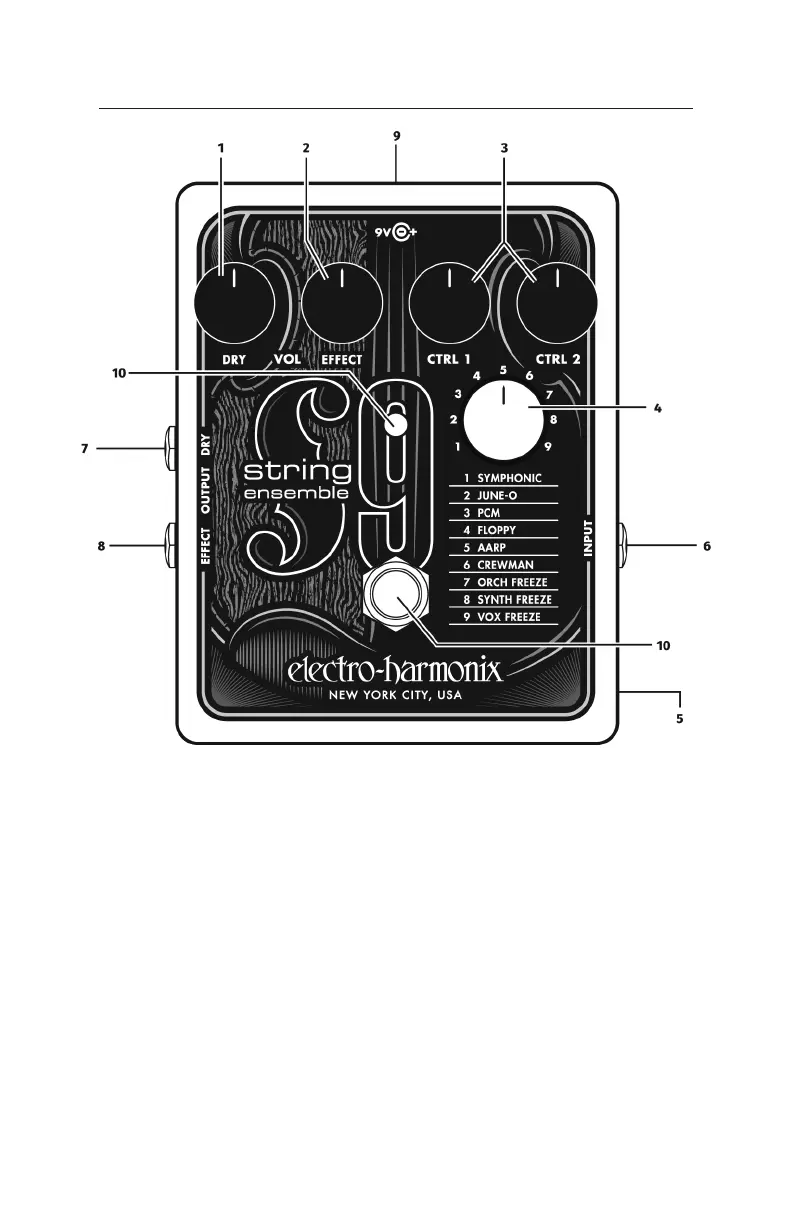
1. DRY VOL Knob The DRY VOL knob controls the volume of the untreated
instrument signal present at the EFFECT OUTPUT jack. The DRY knob does not
control the volume of the DRY OUTPUT jack.
2. EFFECT VOL Knob The EFFECT VOL knob controls the overall volume of the
selected patch at the EFFECT OUTPUT jack.
3. CTRL 1 and CTRL 2 Knobs See the preset descriptions on page 4.
4. PATCH Knob Turn the white knob to select a strings patch.
5. BYPASS MUTE Internal DIP Switch Inside the STRING9 is a small DIP switch
labeled dry/mute. This switch allows you to choose the signal output from the
EFFECT jack when the STRING9 is in bypass mode.
While the STRING9 is in Bypass, and the DIP switch is set to dry (factory
default), the EFFECT jack outputs the signal present at the INPUT. This is the
standard guitar pedal routing for bypass. Set the DIP switch to mute, and
- 2 -
Controls and Connections



 To Next Page