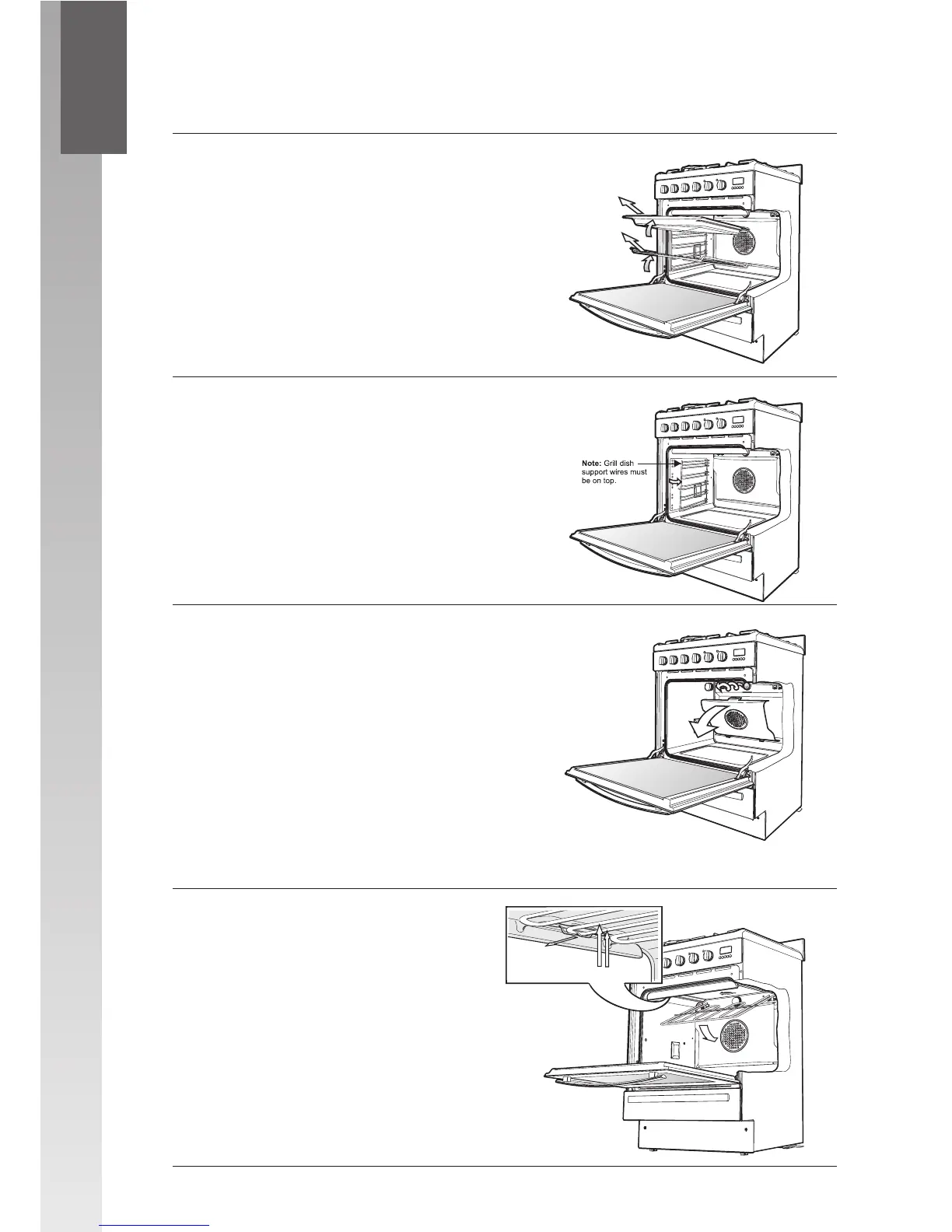
Cleaning the shelves
1 Slide shelves and grill dish forward until
they reach the front stop.
2 Tilt them up at the front to clear the side
supports.
3 Lift the shelves clear.
4 Wash the shelves in hot soapy water.
5 Reverse the above steps to put shelves
back in.
Removing the shelf supports
1 Grasp the shelf supports at the front.
2 Pull them towards the centre of the oven.
3 To install the shelf supports, first insert
the rear hook into the rear hole.
4 Locate the front peg
into the front hole and
push firmly.
Removing the fan cover and
oven light glass
1 Hold fan cover by the two sides near the
top.
2 Pull towards you.
3 To replace the fan cover insert the two
tabs at the bottom of the fan cover into
their corresponding holes and then push
to top in firmly.
4 After cleaning, the fan cover must be
replaced.
5 Turn the oven light glass anti-clockwise to
remove it for globe replacement.
Releasing the element
We have designed the upper element
with a hanger clip to help you reach
your oven roof for cleaning.
• Lift element up carefully.
• Pull hanger clip forward.
The element will drop down freely.
CLEANING THE OVEN
5
18




 To Next Page