Clock Function Application
Uptimer
Maximum is 23 h 59 min. This function has no effect on the operation of the oven.
To turn on and off the Uptimer select: Menu, Settings.
Clock functions are available only for: True Fan Cooking, Conventional Cooking, Turbo
Grilling, Pizza Function, Turbo Grilling + MW, True Fan Cooking + MW.
7.2 How to set: Clock functions
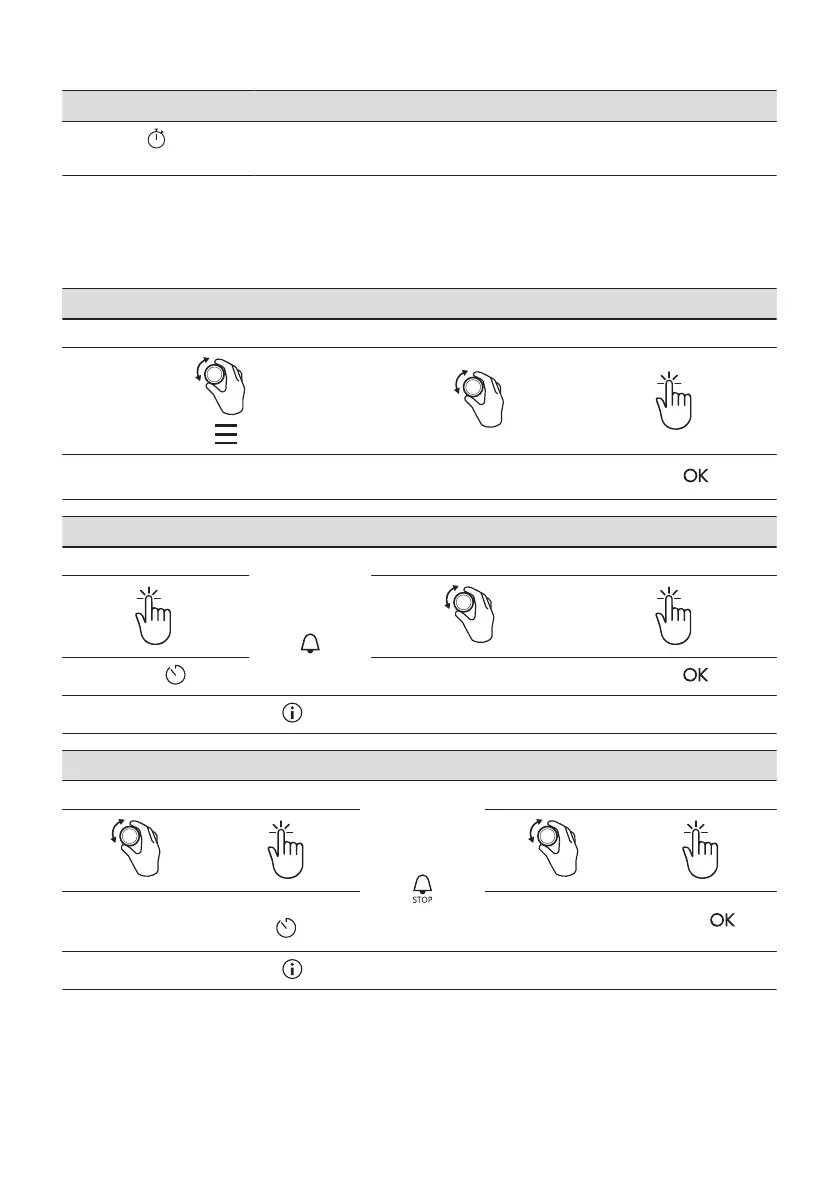
How to set: Time of day
Step 1 Step 2 Step 3
To change the time of day enter the menu and se‐
lect Settings, Time of day.
Set the clock.
Press: .
How to set: Minute minder
Step 1
The display
shows:
0:00
Step 2 Step 3
Press: .
Set the Minute minder
Press: .
Timer starts counting down immediately.
How to set: Cooking time
Step 1 Step 2
The display
shows:
0:00
Step 3 Step 4
Choose a heating
function and set the
temperature.
Press repeatedly:
.
Set the cooking time.
Press: .
Timer starts counting down immediately.
ENGLISH 17







 To Next Page