5.4 Software licences
The software in this product contains components that are based on free and open source
software. Electrolux acknowledges the contributions of the open software and robotics
communities to the development project.
To access the source code of these free and open source software components whose license
conditions require publishing, and to see their full copyright information and applicable license
terms, visit: http://electrolux.opensoftwarerepository.com (folder NIUS).
6. DAILY USE
WARNING!
Refer to Safety chapters.
6.1 How to set: Heating functions
Step 1 Turn the knob for the heating functions and select a heating function.
Step 2 Turn the control knob to set the temperature.
- press and hold to turn on the function: Fast Heat Up. It is available for some oven functions.
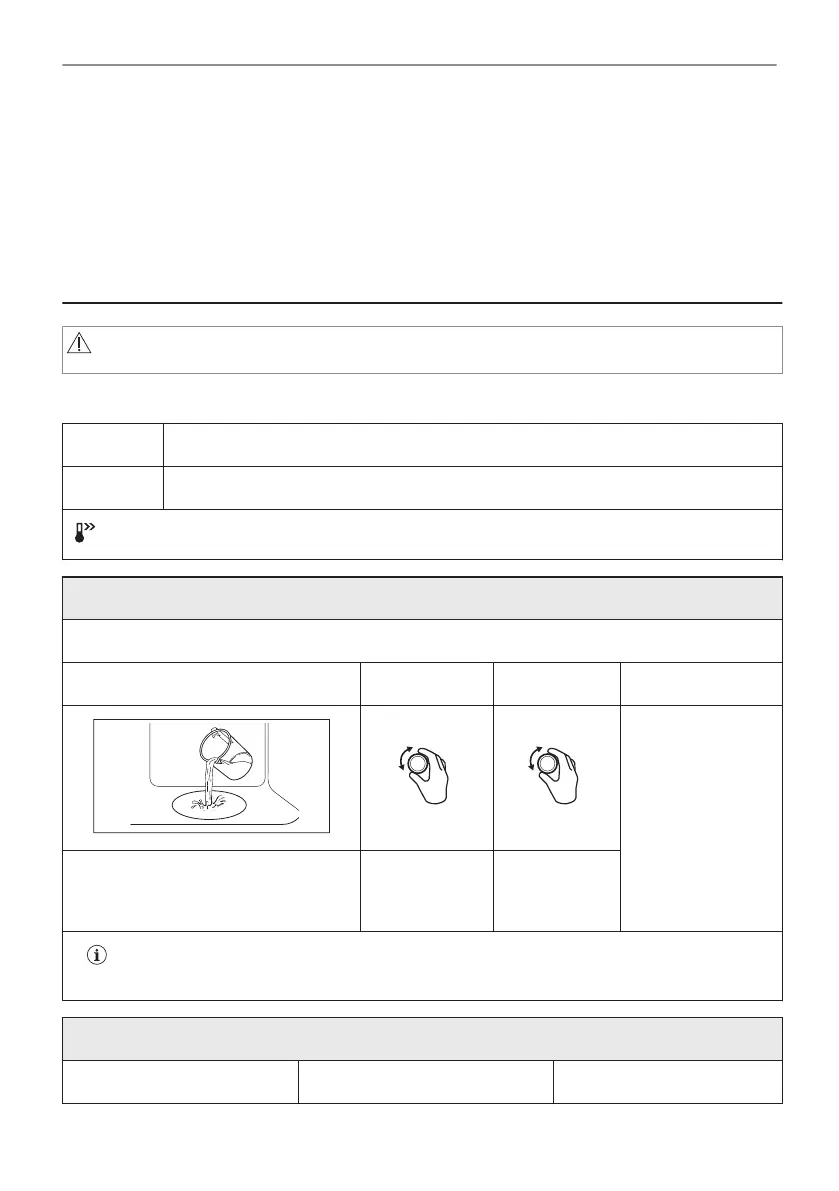
Steam cooking
Make sure that the oven is cold.
Step 1 Step 2 Step 3 Step 4
Preheat the empty
oven for 10 min to
create humidity.
Put food in the
oven.
Fill the cavity embossment with tap
water.
Select the
steam heating
function.
Set the tem‐
perature.
The maximum capacity of the cavity embossment is 250 ml. Do not refill the cavity emboss‐
ment during cooking or when the oven is hot.
When the steam cooking ends:
Step 1 Step 2 Step 3
14/44
DAILY USE






 To Next Page